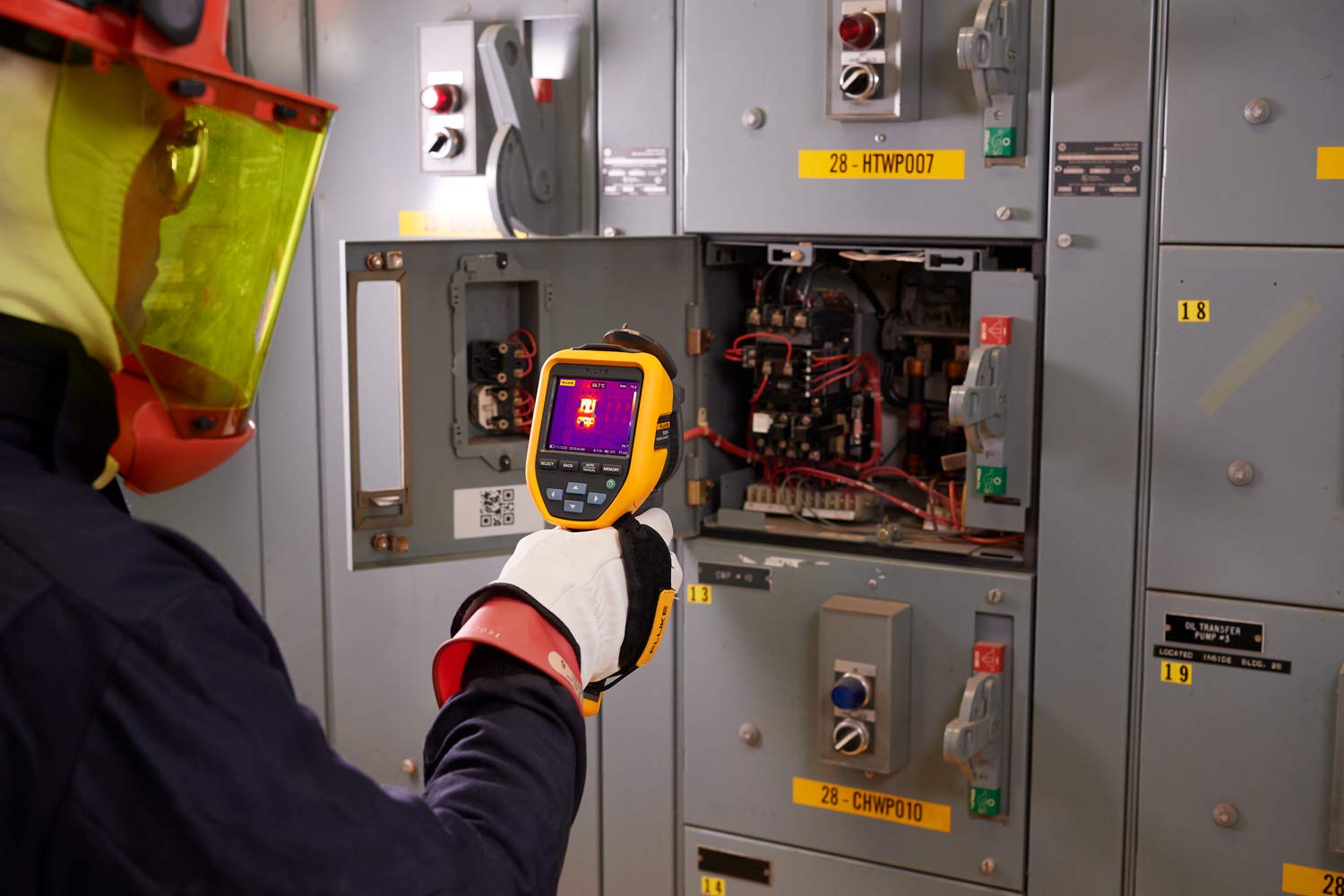
Best Fluke Thermal Cameras (and Their Budget Alternatives)
When it comes to thermal imaging, Fluke is the gold standard. Known for their precision engineering, rugged build, and reliability in the field, Fluke thermal cameras are trusted by electricians, HVAC technicians, engineers, and home inspectors worldwide.
But with a premium reputation comes a premium price tag — and that’s where smart Fluke camera alternatives enter the conversation.
If you’re searching for the best Fluke thermal camera, this guide covers the top choices for professionals and power users alike — plus a powerful budget options from Thermal Master that deliver impressive thermal imaging at a fraction of the cost.
Why Choose a Fluke Thermal Camera?
Fluke thermal cameras are engineered for professionals who rely on accuracy and durability. These devices aren’t just for spotting hot and cold spots — they’re essential diagnostic tools that visualize temperature differences invisible to the naked eye.
Key advantages of Fluke thermal cameras include:
- Exceptional thermal sensitivity — detect temperature differences as small as 0.05°C.
- High IR resolution — crisp, detailed thermal images even from a distance.
- Rugged design — built to withstand industrial environments and field use.
- Intuitive software — easy-to-use interface with advanced analysis tools.
- Calibration and accuracy — dependable results for mission-critical applications.
Whether you’re inspecting switchgear, diagnosing HVAC issues, or checking insulation, Fluke cameras give you the visual clarity and accuracy needed to make confident calls.
4 Best Fluke Thermal Cameras (By Budget)
1. Fluke TiS55+
Best Overall Thermal Camera for Professionals

Resolution: 256×192 IR sensor
Temperature Range: -4°F to 932°F (-20°C to 500°C)
Battery Life: Up to 4 hours
Approx. Price: $4500
Best For: Electricians, building inspectors, and HVAC techs who need reliable, detailed imaging.
The Fluke TiS55+ is a professional-grade workhorse that balances precision and practicality. Its 3.5-inch touchscreen, 160° field of view, and rugged IP54 rating make it suitable for both industrial and field environments. The built-in Fluke Connect app allows wireless image transfer and data management, streamlining inspections across teams.
Pros
- Excellent thermal detail and accuracy
- Durable and ergonomic build
- Advanced reporting via Fluke Connect
- Rechargeable batteries for long sessions
Cons
- Expensive for casual users
- Bulkier than compact smartphone models
2. Fluke Ti480 PRO
Best Infrared Camera for Industrial and Electrical Inspections

Resolution: 640×480 SuperResolution (up to 1280×960)
Temperature Range: -4°F to 1202°F (-20°C to 650°C)
Frame Rate: 30 Hz
Approx. Price: $13,000
Best For: Industrial applications, predictive maintenance, and electrical diagnostics.
This is Fluke’s elite-grade powerhouse — offering exceptional clarity and advanced autofocus. The Ti480 PRO captures intricate temperature variations across complex systems, ideal for detecting overloaded circuits, bearing failures, and process inefficiencies. It integrates seamlessly with Fluke SmartView software for in-depth analysis.
Pros
- Industry-leading image quality
- Robust thermal sensitivity (NETD < 0.05°C)
- LaserSharp autofocus for pinpoint targeting
- Excellent data management options
Cons
- Overkill for non-professionals
- Heavy and costly
3. Fluke PTi120 Pocket Thermal Camera
Best Compact Fluke Model

Resolution: 120×90 IR sensor
Temperature Range: -4°F to 752°F (-20°C to 400°C)
Approx. Price: $1000
Best For: On-the-go technicians, homeowners, or quick visual inspections.
The Fluke PTi120 brings professional thermal imaging into a pocket-sized form factor. Despite its compact body, it features rugged IP54 protection and quick capture for rapid spot checks on electrical panels or HVAC vents. The built-in Fluke Connect Asset Tagging makes organizing and labeling scans simple.
Pros
- Small and highly portable
- Intuitive interface
- Built-in rechargeable battery
- Smart tagging for better workflow
Cons
Perfect — the Fluke TC01B 25Hz iSee Mobile Thermal Camera fits naturally as a mid-tier, mobile-friendly option between the pro-grade Fluke tools and the entry-level Thermal Master P1. Here’s a section written in the same tone and structure as the rest of your article:
4. Fluke TC01B 25Hz iSee
Best iPhone Mobile Thermal Camera (iOS)

Resolution: 256×192 IR sensor
Temperature Range: -4°F to 1022°F (-20°C to 550°C)
Frame Rate: 25 Hz
Approx. Price: ~$500
Best For: Home inspectors, maintenance techs, and contractors who prefer mobile convenience without sacrificing accuracy.
The Fluke TC01B iSee Mobile Thermal Camera bridges the gap between smartphone convenience and professional reliability. Designed exclusively for iOS devices, it connects directly via Lightning port and delivers smooth, real-time thermal imaging at 25 frames per second, which is rare for compact mobile models.
Its 256×192 thermal resolution provides clear temperature gradients for quick diagnostics on electrical panels, HVAC systems, or building envelopes. The temperature range up to 1022°F (550°C) allows use in both residential and light industrial settings, while Fluke’s companion app provides instant image capture, measurement, and sharing.
Pros
- Real-time 25 Hz imaging for fluid temperature tracking
- Compact and lightweight — ideal for field inspections
- High-temperature range for professional-grade versatility
- Fluke iOS app offers intuitive image capture and analysis
Cons
- iOS-only connectivity (no Android version)
- Smaller sensor than full-size Fluke models
- Limited manual focus options
Best For: Technicians, inspectors, and contractors who want a portable, professional thermal solution optimized for iPhone use.
Quality, Affordable Alternatives to Fluke Thermal Cameras
1. Thermal Master P1
Best Affordable Alternative to Fluke

If you’re looking for a budget-friendly alternative to Fluke thermal cameras, the Thermal Master P1 is the best all-in-one option under $150. This compact device plugs directly into your Android phone or USB-C iPhone and instantly transforms it into a thermal imager.
Despite its size, it offers 320×240 enhanced IR resolution, a wide temperature range (-4°F to 1112°F), and impressive clarity for everyday inspection use. It’s ideal for homeowners, energy auditors, or small business owners who need occasional thermal imaging without breaking the bank.
Pros
- Excellent value for price
- Works on both Android and iOS
- Wide temperature detection range
- Lightweight and pocket-sized
Cons
- Dependent on smartphone power
- Lower native IR resolution than Fluke models
- Lacks rugged durability
Best For: DIY energy audits, home maintenance, auto repair, and basic thermal inspections.
5. Thermal Master Thor 002
Best Handheld Thermal Camera Under $500

Resolution: 512×384 X³ IR sensor
Visual Camera: 2 MP
Temperature Range: -4°F to 1022°F (-20°C to 550°C)
Frame Rate: 60 Hz
Thermal Sensitivity: ≤ 40 mK
Display: 3.5-inch 640×480 IPS screen with laser pointer
Approx. Price: ~$500
Best For: Electricians, HVAC technicians, and inspectors who want near-Fluke performance without the premium cost.
The Thermal Master Thor 002 delivers professional-grade thermal imaging in a compact, rugged handheld design. With a 512×384 X³ IR sensor and 60 Hz refresh rate, it produces smooth, detailed thermal visuals ideal for diagnosing electrical loads, plumbing leaks, insulation failures, or mechanical wear.
The integrated 2-megapixel visual camera allows precise image blending and annotation, while the built-in laser pointer helps target exact measurement spots during field inspections. Its 640×480 IPS display provides sharp contrast even in daylight conditions, and the unit’s ergonomic housing withstands job-site handling.
Pros
- High-resolution 512×384 IR sensor rivals mid-tier Fluke models
- 60 Hz frame rate for fast, real-time imaging
- Excellent thermal sensitivity (≤ 40 mK) for subtle temperature differences
- Laser pointer and dual-camera system for precise diagnostics
- Large, bright IPS display with intuitive controls
Cons
- Lacks wireless data transfer or app integration
- Heavier than smartphone-based models
Best For: Professionals seeking a standalone thermal imager with impressive clarity, speed, and durability—perfect for users who want to upgrade from mobile plug-ins to a full handheld experience without crossing the $500 threshold.
How Fluke Compares to the Thermal Master P1
| Feature | Fluke TiS55+ | Fluke Ti480 PRO | Fluke PTi120 | Thermal Master P1 |
|---|---|---|---|---|
| IR Resolution | 256×192 | 640×480 (SuperRes 1280×960) | 120×90 | 320×240 (Enhanced) |
| Temperature Range | -4°F–932°F | -4°F–1202°F | -4°F–752°F | -4°F–1112°F |
| Connectivity | Fluke Connect App | SmartView Software | Fluke Connect | Smartphone Plug-in |
| Price Range | ~$1,999 | ~$8,499 | ~$899 | ~$129 |
| Ideal User | Field Technicians | Industrial Engineers | Quick Inspections | DIY/Home Use |
How to Choose Between Fluke and Thermal Master
- For Professionals:
Go with Fluke TiS55+ or Ti480 PRO if your work demands accuracy, calibration, and advanced reporting tools. - For Light Commercial or Personal Use:
Choose Fluke PTi120 — compact, rugged, and more affordable. - For Budget Users or Beginners:
Try the Thermal Master P1 from Amazon — it’s a remarkably capable plug-in thermal camera for mobile devices, perfect for anyone starting with thermal imaging.
Frequently Asked Questions About Thermal Cameras
What’s the real difference between a thermal camera and a regular infrared thermometer?
A thermometer gives you one temperature reading — one little dot. A thermal camera shows you the whole picture. You can actually see where heat’s escaping, where something’s running hot, or where cold air’s leaking in. Once you use one, you realize how blind you were with just a spot gun.
Why do Fluke cameras cost so much?
Because they’re built for pros. Fluke doesn’t make toys — their stuff is designed to live in tool bags, job sites, and factories. They’re calibrated down to crazy-tight tolerances, they survive drops, and they give you the same reading today, next month, and five years from now. You’re paying for accuracy that doesn’t drift and hardware that doesn’t die on you.
Are Fluke cameras too much for home inspections?
Not really. In fact, they’re kind of perfect for that. You can find missing insulation, air leaks, and roof issues in minutes. Even the smaller PTi120 punches way above its weight for residential work — compact, tough, and accurate.
Can a thermal camera see through glass?
Nope. That’s a common misconception. Glass reflects heat instead of letting it pass through, so what you’ll see is just the temperature of the glass itself. If you need to measure something inside a window, you’ll have to open it or shoot from another angle.
Are handheld thermal cameras accurate enough for serious jobs?
These days, yes. Something like the Thermal Master Thor 002 gives you a really clean 512×384 image at 60Hz. That’s fast and detailed enough for electricians, HVAC techs, or energy auditors. It’s not a $9,000 Fluke, but it gets impressively close.
What kind of resolution should I look for?
It depends on what you’re doing. If you’re just checking for heat leaks around the house, a 120×90 or 256×192 camera will work fine. For professional work, you’ll want 320×240 or better. Industrial inspections usually start around 640×480 and up — that’s where the image gets really sharp.
Can these cameras really help find water leaks?
Yes, and they’re surprisingly good at it. Wet spots tend to cool down faster than dry ones, so they stand out on the screen. You’ll literally see where a pipe’s leaking under the floor or a roof’s letting water in. It’s not magic — it’s just physics made visible.
What’s “thermal sensitivity,” and why does it matter?
Thermal sensitivity, or NETD, basically means how small of a temperature difference the camera can see. Lower is better. A camera rated at 40 mK can show subtle temperature shifts that a cheaper model will completely miss.
Should I go for 60Hz or 25Hz?
If you’re scanning moving machines or anything with motion, go 60Hz. It’s smooth, responsive, and gives you real-time detail. Lower frame rates work fine for still images, but 9Hz or 25Hz can feel a little jumpy if you’re sweeping over large areas.
Can I just use one of those plug-in phone cameras instead of a full-size one?
You can, depending on how often you need it. The Fluke TC01B and Thermal Master P1 are great little gadgets for quick checks. But if you’re doing this every day, a dedicated handheld unit is a better investment — it’s faster, more consistent, and doesn’t drain your phone battery.
Do any thermal cameras work on both iPhone and Android?
Most don’t, but the Thermal Master P1 does. It connects through USB-C, so it works with Android phones and the new iPhones that switched to USB-C. That’s a nice bonus if you use both types of devices.
Can I record thermal videos or take snapshots?
Yes. Pretty much all modern cameras let you save images and short clips. Higher-end models like the Fluke TiS55+ or Ti480 PRO make it super easy — they sync automatically with Fluke Connect or SmartView for reports and storage.
What temperature range do I need?
For HVAC or home energy work, anything that reads up to 500°F (about 260°C) will do. If you’re checking electrical panels, engines, or industrial gear, look for something that reaches 1000°F (540°C) or more. The Fluke Ti480 PRO and Thor 002 both hit that mark.
How do thermal cameras help with energy efficiency?
They show you exactly where you’re losing heat — the places insulation or weatherproofing isn’t doing its job. Once you spot those cold or hot spots, you can fix them, and the savings show up on your power bill almost immediately.
Can I use a thermal camera outside?
Yes, as long as it’s built for it. Fluke’s cameras are sealed against dust and moisture (usually IP54 rated). They’re made for job sites, not just clean indoor labs. If you go cheaper, check the specs — some of the budget cameras shouldn’t get rained on.
What’s the best alternative to a Fluke camera?
The Thermal Master Thor 002 is the top pick for serious users under $1,000. It’s rugged, sharp, and fast. The P1 is the pocket version — great if you want something small and inexpensive for light-duty work.
How do I make sure my readings stay accurate?
Most pro cameras auto-calibrate. If yours doesn’t, you can check it against a known temperature, like a surface you’ve measured with a reliable thermometer. Just avoid shiny metal — it reflects heat and can throw off your results.
Does the weather affect readings?
It can. If the camera’s been sitting in the cold or heat, give it a few minutes to adjust before you start scanning. Once it stabilizes to room temp, your readings will be much more reliable.
Are people really using AI with thermal cameras now?
They are. Some newer tools can analyze thermal images automatically — spotting unusual heat patterns or potential failures before they happen. Fluke already ties some of its software into that kind of analysis, and more third-party options are popping up.
What’s a good camera for beginners?
The Thermal Master P1 is perfect if you’re new. Plug it into your phone, open the app, and you’re off and running. You’ll start noticing things you’ve never seen before — cold air leaks, hot electrical lines, even hidden pipes in the wall. Once you get comfortable, you can always upgrade later to a handheld unit like the Thor 002.
Final Thoughts
If you’re in a field that depends on accurate thermal diagnostics, Fluke remains the benchmark. The TiS55+ and Ti480 PRO deliver uncompromising performance for serious professionals. But for everyday users or those testing the waters of infrared technology, the Thermal Master P1 offers stunning versatility for its size and price — giving you a powerful window into the invisible world of heat, right from your smartphone.
Affiliate Disclosure
Some links in this article may be affiliate links. This means that if you click on them and make a purchase, we may earn a small commission at no extra cost to you. This helps support our research and keeps our recommendations unbiased.





Leave a Reply