Looking for the best ear camera for home use? This guide compares the top picks by ease of use, screen type, comfort, and real-world value, with quick pros, cons, and a long FAQ.
Ear cameras have become a practical tool for people who want a clearer look before they start poking around blindly. The best ear camera are is not just about image quality. They also come down to comfort, setup, safety features, and whether the device actually makes home ear checks easier.
Medical guidance still matters here. Mayo Clinic notes that putting objects into the ear canal can push wax deeper and increase the risk of injury, which is why a camera-based view can be more helpful than guessing by feel alone.
This guide focuses on five ear cameras that are currently available on Amazon and fit different needs, from simple phone-connected tools to all-in-one models with built-in screens.
I also kept everyday use in mind, because the best otoscope camera for home use is usually the one that feels easy enough to reach for without turning into a hassle. For broader patient guidance on earwax and when to get professional help, ENT Health is a useful reference point.
Related Articles
- 5 Best Camera Glasses (4K, Spy, Budget)
- 4 Best Fluke Thermal Cameras (#1 Budget Alternatives)
- 5 Best Drones for Real Estate Photography
Quick picks
- Best overall: Teslong Digital Otoscope with Light
- Best with a built-in screen: Anykit Digital Otoscope with Gyroscope, 4.5 Inches Screen
- Best premium pick: BEBIRD Earsight Plus
- Best for family use: BEBIRD R1 Ultra
- Best screen-based alternative: ScopeAround Otoscope with 4.5″ IPS Screen
Comparison table: core features
| Product | Best for | Connection style | Screen type | Recording support |
|---|---|---|---|---|
| Teslong Digital Otoscope with Light | Most people | Wired to phone/device | Uses connected device | Yes |
| Anykit Digital Otoscope with Gyroscope | No-app convenience | Standalone | Built-in 4.5-inch screen | Yes |
| BEBIRD Earsight Plus | Premium flexibility | Wireless | Phone-based viewing | Yes |
| BEBIRD R1 Ultra | Repeat household use | Wireless | Phone-based viewing | Yes |
| ScopeAround Otoscope with 4.5″ IPS Screen | Easy direct viewing | Standalone | Built-in 4.5-inch screen | Yes |
Comparison table: buying fit
| Product | Ease of setup | Good for beginners | Main tradeoff |
|---|---|---|---|
| Teslong Digital Otoscope with Light | Easy | Yes | Needs device connection |
| Anykit Digital Otoscope with Gyroscope | Very easy | Yes | Bulkier than pen-style models |
| BEBIRD Earsight Plus | Moderate | Yes, with app comfort | Higher price |
| BEBIRD R1 Ultra | Moderate | Better after first setup | More accessories than some people need |
| ScopeAround Otoscope with 4.5″ IPS Screen | Very easy | Yes | Less compact than phone-based picks |
How I chose the best ear cameras
Image clarity matters because a fuzzy picture defeats the whole point of using an ear camera. I also looked at whether the product is built around a phone connection or a built-in screen, since that changes the day-to-day experience a lot.
Some people want a slim tool they can pair with a phone. Others want to turn it on and see the image right away.
I also paid attention to safety-oriented design cues in the listings, such as protective covers, specula, softer silicone tips, and features meant to help reduce over-insertion. That does not make any ear camera risk-free, but it does make some models more practical than others for cautious home use.
1. Teslong Digital Otoscope with Light

Best overall for most people
The Teslong Digital Otoscope with Light is the one I would start with for most readers. It keeps the concept simple. You connect it to a compatible phone or device, launch the app, and get live viewing plus photo and video capture.
The listing also highlights included specula and silicone ear picks, which makes it feel more complete out of the box than some bare-bones options.
What makes it stand out is balance. It is not trying to be the fanciest ear camera on the page. It is trying to be useful. That usually wins. For adults who want a reliable ear wax removal camera for iPhone and Android style use, or anyone who prefers a slimmer, more traditional tool over a larger screen-based unit, this is a strong fit.
Pros
- Straightforward phone-connected setup
- Photo and video capture
- Includes specula and ear picks
- Practical pick for occasional home checks
Cons
- Not as convenient as a built-in screen model
- Listing notes limited desktop compatibility
Real Testimony
This item is well made. All the extra parts are packaged separately and simple to keep organized and clean.
Functionality is easy enough. I preferred the wired connection to my phone as opposed wireless. No glitches or freezing. Very nice case that holds everything compact. Light weight and easy to work with. The camera angle takes some practice yet easy to navigate once the directions are sorted out. That’s more to do with human effort than the product. Very clear picture!!
I returned another product in less than 24 hours because of the absurdity of it. So I opened this with a great amount of speculation. This was an overall pleasant purchase.
I cannot speak on longevity of this product, only on over initial purchase and use.
2. Anykit Digital Otoscope with Gyroscope, 4.5 Inches Screen
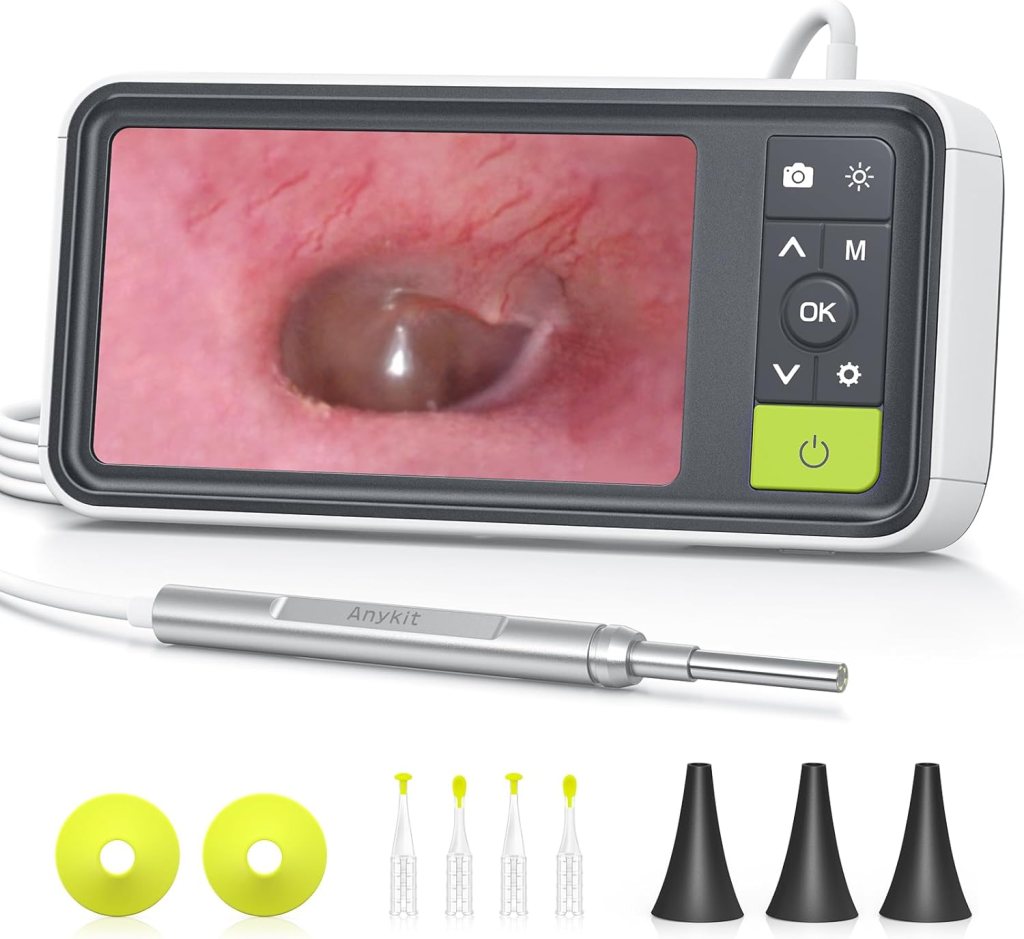
Best ear camera with a built-in screen
If you do not want to mess with apps, pairing, or using your phone as the display, the Anykit model earns a very easy recommendation. Its biggest advantage is right in the product name: a built-in 4.5-inch screen.
That makes it much more approachable for people who want a device that works right away. The listing also mentions a 3.9mm camera probe, six lights, 32GB storage, and support for photo and video recording.
This is the one I would point to for older users, less techy buyers, or anyone who just wants to power on and start checking. The shape is less pocketable than slim phone-connected tools, but the convenience is the whole point. It removes friction, and that matters.
Pros
- Built-in 4.5-inch display
- No phone app required
- Video and photo support
- Good beginner-friendly format
Cons
- Larger body than pen-style tools
- Less travel-friendly than smaller models
Real Testimony
A great little lighted scope with its own display so you dont have to attach it to your phone. Great quality screen and detailed images. If you have problem ears this might be for you. Cost less than a doctor visit.
3. BEBIRD Earsight Plus
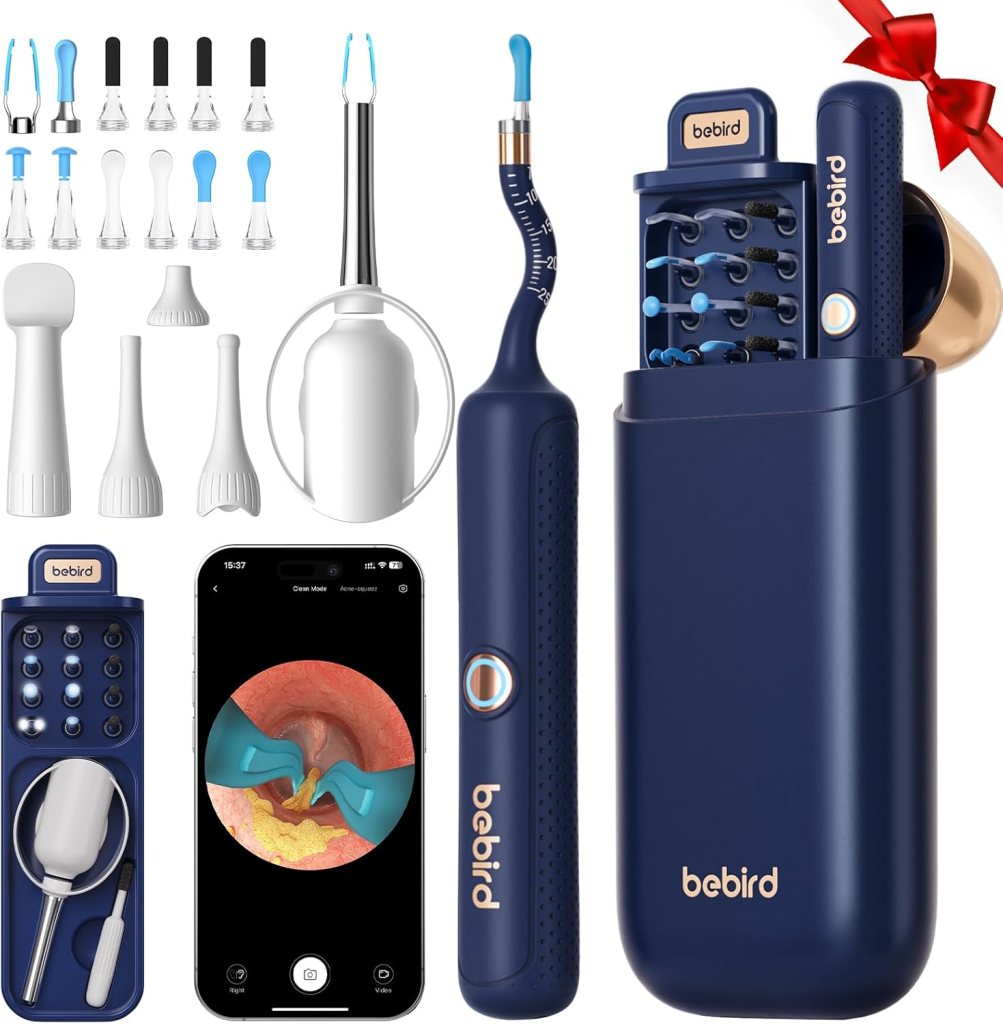
Best premium ear camera
The BEBIRD Earsight Plus is the premium pick in this lineup. What pushes it into that category is not just the brand name. The current Amazon result highlights a flexible, bendable design and a camera built around waterproof, dustproof, and anti-fog positioning.
That points to a model focused on a smoother viewing experience inside the ear canal, which is exactly what you want if you are paying more.
This is a good choice for buyers who know they will use an ear camera regularly and want something that feels more refined than entry-level tools. It is also a better fit for people who value comfort and want a device that sounds purpose-built rather than generic.
Pros
- Premium, flexible design
- Strong emphasis on comfort and visibility
- Better fit for repeat use
- Good choice for shoppers who dislike cheap-feeling tools
Cons
- Higher price tier
- More than casual users may need
Real Testimony
This is a smart ear cleaning tool with a built-in HD camera that connects to your phone for clear, real-time viewing. It offers flexible silicone tips and bright lighting, making it safer and easier to remove wax. The app connection works well once set up and the visuals are surprisingly detailed.
Overall, it is a handy and effective device for at-home ear care if used carefully.
4. BEBIRD R1 Ultra
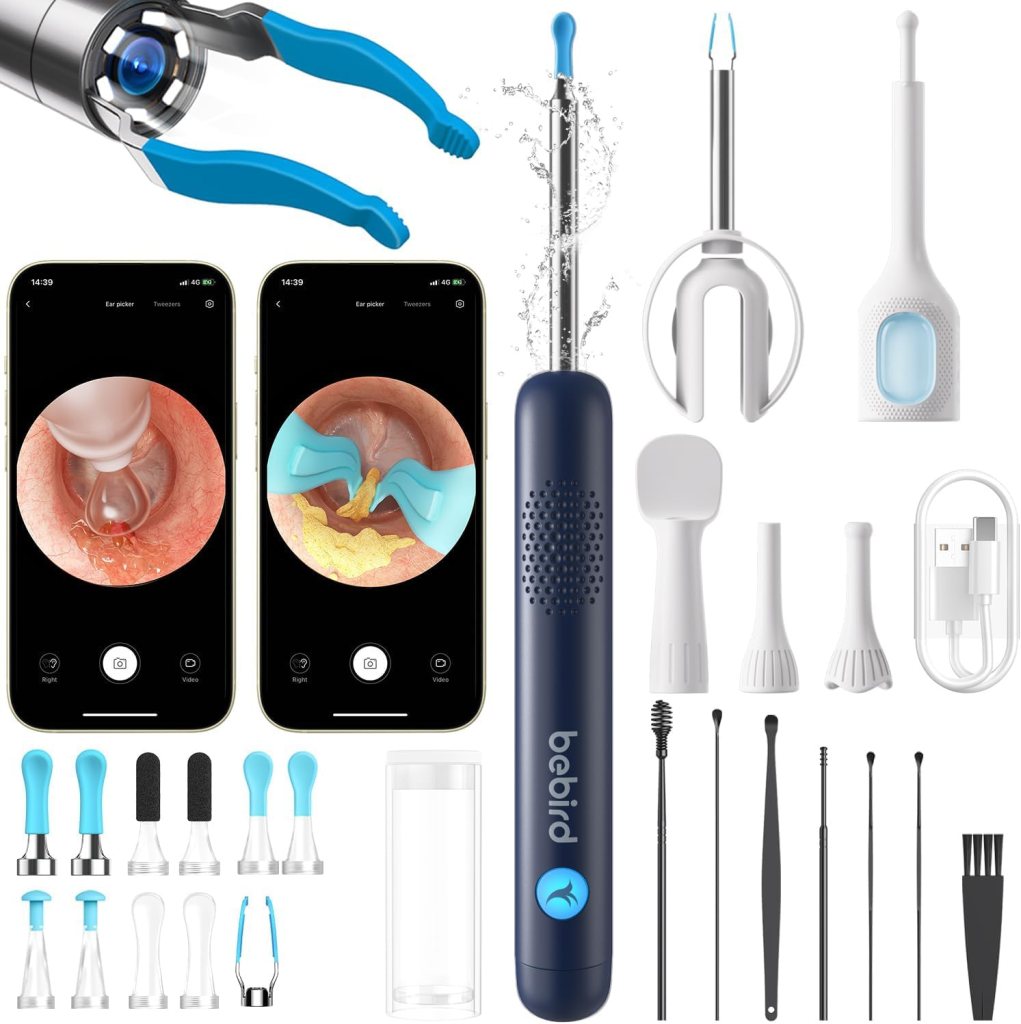
Best for families and repeat use
The BEBIRD R1 Ultra makes sense for homes where the tool will get used more than once in a blue moon. Amazon results describe it as a broader ear examination and cleaning kit, with a high-resolution camera, wide-angle view, LED lights, and accessories that support more regular household use.
That broader kit approach is why it fits the “best for family use” category. It feels less like a single-purpose gadget and more like a visual ear-care toolset. That said, it is still something to use carefully.
A more capable tool can tempt people to get too confident, and that is where home use can go sideways.
Pros
- Strong all-around home-use feature set
- Good for repeat checks
- Visual cleaning and examination focus
- Better value for shared household use
Cons
- Setup is not as instant as a screen model
- Can feel like overkill for occasional users
Real Testimony
I am giving this product 5 starts because the most important thing that I needed, it does great. You can get an absolute clear view of your ear canal and see wax buildup and gently remove it. The connection to iPhone works well without major fuss. The phone App overall is decent.
However, having said that there are a few things the buyer should know:
1) It takes some practice using this tool because the imaging is “mirrored” meaning when you want to move to the right, you have to move the tool to the left. When you want to move the tool up, you have to move it down. Takes a little bit to get use to.
2) I would have liked to have seen more instructions with the various attachments and how things fit together. Yes, you ultimately can figure it out but some better documentation would have been nice.
3) Some type of case for the scope and its associated tools would have been nice. The package is very thin flexible plastic and not good for storage.
5. ScopeAround Otoscope with 4.5″ IPS Screen
Best screen-based alternative
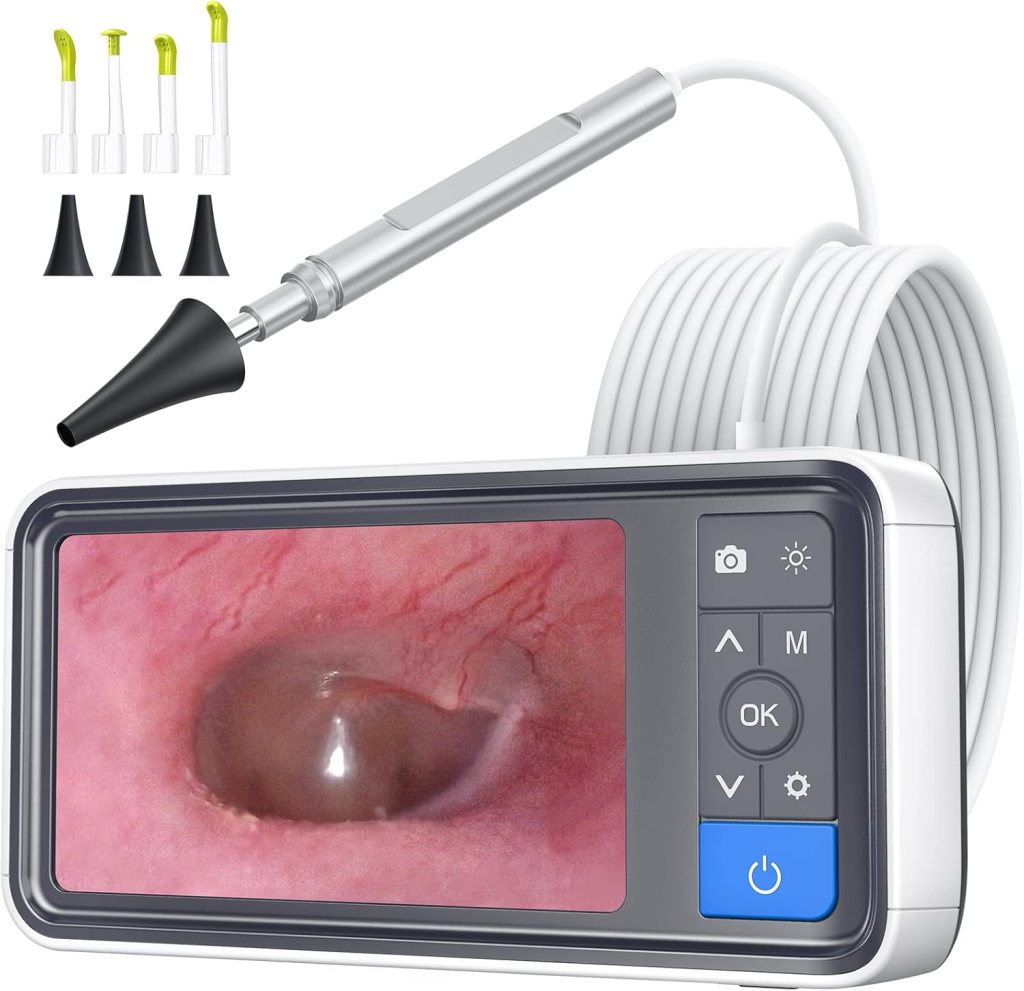
ScopeAround fills an important slot in this guide because not everyone wants the same kind of screen model. The live Amazon result shows a 4.5-inch IPS screen, a 3.9mm ear camera, gyroscope support, a 32GB card, and no-app-needed convenience.
In other words, it competes directly with the Anykit style of buyer experience.
I like it as an alternative pick because some shoppers want direct viewing without going too far into premium pricing. If your main goal is simple home ear checks with less setup and less phone dependency, it deserves a look.
Pros
- Built-in screen
- No app needed
- Easy direct viewing
- Good alternative to phone-connected tools
Cons
- Bigger than wireless pen-style models
- Less compact for storage and travel
Real Testimony
The image is very clear on the screen. You can see clearly even with the black exam scope tips attached.
I left the scope on for at least 10 minutes to see if the light would get too hot for my ear. I thought maybe I noticed only a very mild warmth on my finger from the light after 10 minutes, but I was still able to put the scope in my ear, touching all the sides of my ear, and not feel any difference in my ear canal.Only con: once you attach a cleaning tip on the end of the scope and insert into your ear canal, you cannot see what the tip is touching before it makes contact. I touched the tympanic membrane several times and winced before I realized I was not going to be able to see or feel how far into my ear canal the cleaning tip was. I do not recommend using the tips for cleaning out your ear canal if you are using the camera to try and visualize ear wax at the same time.
What to look for in the best ear camera
The first choice is screen style. A built-in display is easier for many people. A phone-connected ear camera is usually more compact.
The second is tip design. Softer silicone tips and protective covers are not just nice extras. They matter because the safest tool is the one that helps you stay slow and controlled.
Third, think about recording. Photos and video are useful if you want to track what you are seeing over time or show a clinician later. Several of the models above support that.
How to use an ear camera safely at home
Go slowly. Stop the moment you feel pain. Do not force the tip deeper just because the image looks interesting.
If you have drainage, bleeding, known eardrum problems, a recent ear procedure, or significant pain, skip home cleanup and get medical advice instead. ENT guidance also warns against self-treatment in people with prior ear surgery or a hole in the eardrum unless a specialist has cleared it.
FAQ
What is the best ear camera for home use?
For most people, the Teslong Digital Otoscope with Light is the best balance of usability, viewing support, and value. If you want the easiest experience possible, the Anykit with the 4.5-inch screen is even simpler to use.
Are ear cameras safe?
They can be safer than blind cleaning because you can actually see what you are doing, but they are not risk-free. Medical guidance still warns against putting objects into the ear canal carelessly, especially if there is pain, drainage, or a possible eardrum problem.
Can an ear camera damage your ear?
Yes, if you push too far, move too fast, or keep going when there is pain. The camera does not remove the risk. It just gives you a better view than guessing.
What ear camera works with iPhone and Android?
The Teslong listing specifically highlights compatibility with iPhone, iPad, Android, and USB-connected use.
Is an ear camera better than a regular otoscope?
For home users, often yes. A digital ear camera usually makes it easier to see the canal clearly, especially if it shows the image on a phone or built-in screen. That is a lot easier for beginners than using a classic handheld otoscope.
Can you use an ear camera on children?
Only very carefully, and not if the child is moving around or distressed. Some product listings market family use, but that does not replace medical caution. When in doubt, let a clinician handle it.
What camera size is best for an ear canal?
In this category, several screen models are listed with a 3.9mm ear scope camera, which is a common size for home-use products. Smaller probes can feel easier to manage, but careful handling matters more than chasing a tiny measurement.
Should I choose a built-in screen or a phone-connected ear camera?
Choose a built-in screen if you want speed and simplicity. Choose a phone-connected model if you want a slimmer tool and do not mind using an app or connected device.
Can ear cameras record photos and video?
Yes. Teslong, Anykit, and several other picks in this guide support photo and video capture according to current listings.
Are cheap ear cameras worth it?
Some are, but quality control can vary. If you only want a basic look now and then, a simpler model may be enough. If you care about repeat use, comfort, or a more stable image, spending a bit more usually makes sense.
When should you stop using an ear camera and see a doctor?
Stop if there is pain, bleeding, drainage, dizziness, hearing changes, or if you think the wax is too deep to remove safely. Professional removal is often the better choice for stubborn blockages or higher-risk ears. ENT guidance are very clear on that point.
Final verdict
If you want the strongest all-around pick from these 5 Best Ear Cameras, start with the Teslong. If ease matters most, the Anykit built-in screen model is the least fussy option. If you want something more polished for frequent use, the BEBIRD Earsight Plus and R1 Ultra are the more premium choices.
ScopeAround rounds out the list nicely for buyers who want a direct-view screen model without relying on a phone. For the bigger picture on when home care makes sense and when professional care is smarter, the American Academy of Family Physicians offers helpful patient guidance on cerumen impaction.
Affiliate Disclaimer
This article contains affiliate links. We may earn a small commission if you purchase through these links, at no extra cost to you.




Leave a Reply