
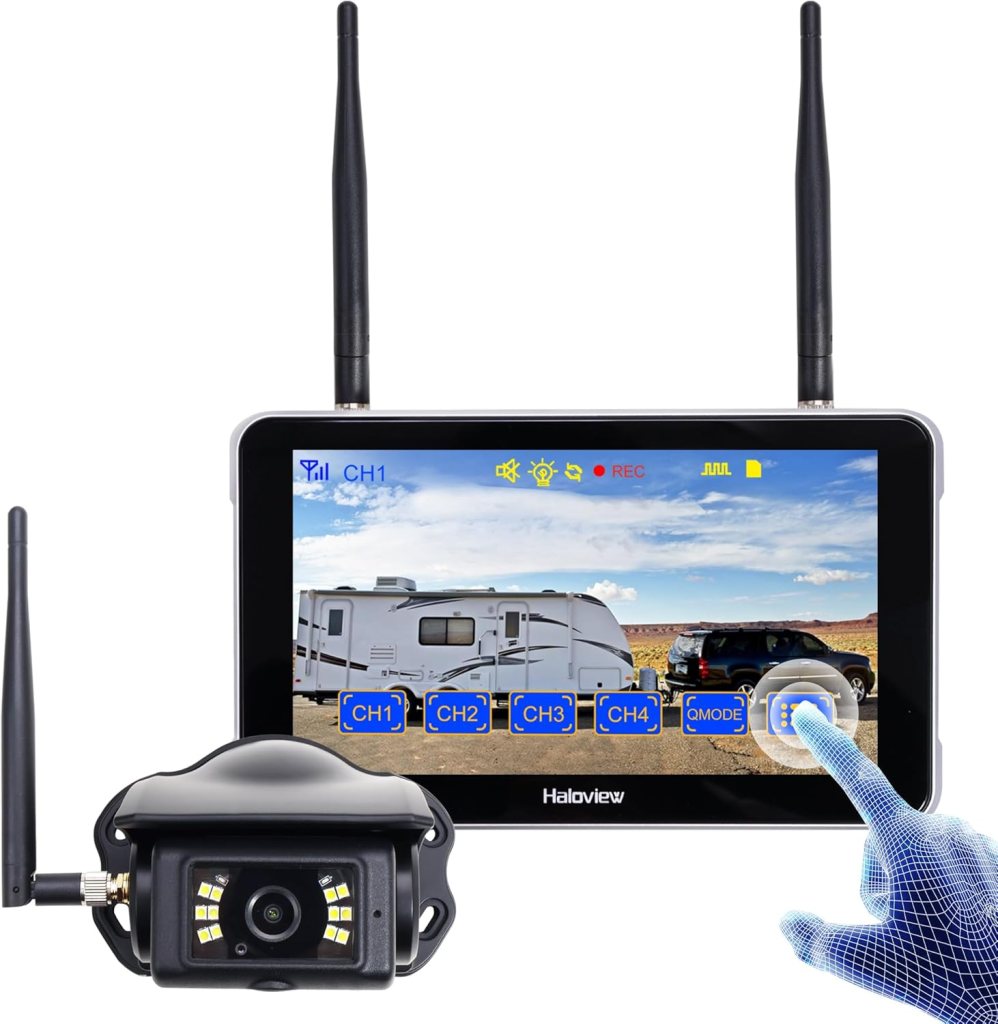
Short answer: it’s a really great choice. After using the BT7 Touch on late-night grocery runs, rain-slick parallel parks, and a couple of trailer-backing moments that should’ve been stressful, it’s the kit I trust most.
It feels premium where it matters—image, night visibility, and the big 7-inch touchscreen. It’s not flawless (I’ll be transparent about that), but its overall balance is why it’s sitting around 4.7/5 stars on Amazon and why I keep recommending it.
What immediately impressed me
- The night view looks like the real world, not a mushy grey smear.
- The 7″ touch display is big enough to judge distance at a glance.
- Wireless link stayed solid on both an SUV and a camper trailer.
- Built-in DVR made it easy to save a parking-lot “near miss” clip without reaching for my phone.
Why it wins at night
On dim streets, the BT7 Touch keeps color and contrast longer than most kits; you don’t lose the curb, pets, or backpacks in mush. When it’s truly dark—country driveway, alley, unlit lot—you tap the on-screen control and the camera’s fill lights click on. Suddenly, edges and obstacles pop. That single button turns “I hope I’m clear” into “I can see exactly what I’m doing.”
Highlights:
- Full-color low-light image before you ever need extra light
- Touch-controlled fill lights for pitch-black situations
- Auto-dimming monitor so you’re not blinded at midnight
Image, interface, and latency
The camera feeds a clean 1080p signal. The larger screen matters more than you’d think: with 5″ displays I tend to squint; with 7″ I glance, decide, move. Latency is low enough that the video matches what your foot is doing on the brake—no unnerving delay. The UI is genuinely friendly: tap to toggle lights, swipe layouts if you add more cameras, and adjust guide lines to match where your bumper actually is.
What I liked day-to-day:
- Crisp 1080p with smooth exposure changes moving shade → sun
- Simple distance-line calibration in the menu
- One-touch clip lock from the DVR when anything sketchy happens
Wireless range and reliability
These systems are built with bigger vehicles in mind. I tried to break the link—steel canopy, busy RF downtown, reversing past a row of cars—and it stayed glued. If you tow or plan to add a hitch/side camera later, it’s reassuring to know the radio isn’t already at its limit.

Install notes from doing it myself
- Mount high and centered (above plate or hatch). Tilt until a sliver of bumper is just visible at the bottom of frame.
- Power the camera from the reverse light (or a switched 12 V if you want it live with ignition).
- Power the monitor via 12 V or USB-C; place it low and close in your line of sight.
- Do your final aim test at night. If you see glare bouncing off chrome, tilt the camera down a hair.
- Expect ~45–60 minutes if you’re comfortable with basic 12 V; an audio shop can knock it out quickly if you’d rather not.
Where it isn’t perfect (transparent takes)
- It’s a premium kit. On a small sedan that only backs up in daylight, it might feel like overkill.
- Still a “real” install: two power taps (camera and monitor), even though you don’t run a video cable end-to-end.
- Dedicated monitor by design. If you insist on using your phone as the screen, this isn’t that product.
How it behaves in lousy weather
Rain: the hood over the lens sheds droplets fairly well, but—like any camera—a quick wipe after a storm helps.
Glare: auto-dimming prevents “flashbang” syndrome under bright signage at night.
Cold mornings: link came up quickly; no lag spikes during those first frosty minutes.
Who should absolutely buy it
- Truck/SUV/RV owners who back in the dark regularly
- Drivers who might add side or hitch cams later and want an expandable system
- Anyone tired of tiny, laggy displays and ghostly night images
- Split screen for multiple camera views

Who probably doesn’t need this much camera
- Compact-car drivers who only reverse in daylight and want the cheapest workable option
- People determined to use a phone display instead of a dedicated monitor
My go-to starting settings
- Show just a thin strip of bumper at the bottom of the frame
- Auto-dimming on (and brightness one notch down if your cabin is glossy)
- Distance lines enabled and adjusted to match “stop here” reality
- Fill lights off by default; tap them only in truly dark spots
Quick troubleshooting cheat-sheet
- Washed-out image at night → lower monitor brightness one step; avoid pointing straight at reflective trim
- Occasional sparkle or flare → clean the lens and tilt down a degree
- Brief jitter in a long vehicle → reposition the monitor antenna away from A-pillars or metal trim
- Fill lights reflecting off the bumper → nudge the camera angle down slightly
Living with the built-in DVR
- It loops to microSD while the monitor has power—set it and forget it
- Tap to lock a clip if something happens while backing
- It’s not a replacement for a forward dashcam, but it’s a perfect rear-incident safety net
Verdict
Is the Haloview BT7 Touch the best backup camera with night vision? For most drivers who care about after-dark confidence, yes. The night picture is clear and honest, the wireless link is boringly reliable, and the 7-inch touchscreen turns backing into a glance-and-go task instead of a squint-and-pray ritual. It costs more than entry-level kits and it’s more system than some compact cars need, but if you value night visibility, low lag, and room to expand with additional cameras, it’s the one I’d buy again.
FAQ: Haloview BT7 Touch
Does it really have night vision I can trust?
Yes. In dim light you get full-color visibility; in true darkness you can tap the on-screen control to switch on the camera’s fill lights. That combo lets you pick out curbs, pets, bikes, and low posts instead of guessing.
How is the image during the day?
Clean 1080p with smooth exposure transitions. It doesn’t crank fake sharpness, so edges look natural. The 7″ display gives you enough real estate to judge distance at a glance.
Is there any lag when I’m reversing?
Latency is low enough that what you see matches your pedal inputs. If you ever notice a hiccup, relocate the monitor antenna away from metal pillars or move the monitor slightly for a cleaner path.
Will it work on an SUV, pickup, or RV?
Yes. The wireless link is built for larger vehicles. I’ve used it on an SUV and a half-ton truck with a canopy without dropouts. For very long rigs, place the monitor where the antenna has a clear path and consider adding side or hitch cams for coverage.
Can I add more cameras later?
Up to four. You can split the view or swipe between angles. Popular adds: a hitch cam for trailers and a curb-side camera for parallel parking.
Does it record?
There’s a built-in DVR. Pop in a microSD card and it will loop-record while the monitor has power. Tap to lock a clip if something happens while backing.
How hard is the install?
It’s a “real” but straightforward install:
- Camera: mount high and centered, power from reverse light (or switched 12 V for always-on).
- Monitor: mount on the dash, power via 12 V or USB-C.
- Final step: night test; tilt the camera slightly if the fill lights reflect off chrome or a shiny bumper.
If you don’t want to DIY, any audio/accessory shop can wire it quickly.
Will it interfere with my dashcam, phone, or CarPlay?
No issues in my use. The BT7 runs its own link. Keep power cables tidy and avoid stacking multiple high-draw adapters in a single 12 V socket.
How bright is the screen at night?
Auto-dimming handles most situations. If you drive under bright signage or tunnel lights, drop brightness one notch—calmer on the eyes.
Can I use my phone as the screen?
No. The dedicated 7″ monitor is the design choice here—safer and faster to glance than juggling an app.
Does weather affect it?
It’s built for exterior mounting. Tips:
- Rain: the lens hood helps, but a quick wipe after storms is smart.
- Snow/cold: link comes up normally; brush off ice from the hood.
- Heat: standard parked-car advice—don’t leave the monitor baking in direct sun if you can help it.
What’s the ideal camera angle?
Show a thin strip of bumper at the bottom of the frame. That anchors your depth perception. Use the menu to align the guide lines so the red bar equals “do not roll farther.”
My night image looks washed out—what should I change?
- Lower monitor brightness one step.
- Tilt the camera down a degree to reduce glare from trim.
- Clean the lens; a tiny film of water or dust blooms highlights at night.
The picture jitters on my long vehicle—fix?
- Move the monitor or its antenna away from thick metal pillars.
- Ensure the camera ground is solid.
- Avoid coiling excess power cable into a tight loop under the dash.
Can I power the camera without tying into the reverse light?
Yes, any switched 12 V source works if you prefer the camera active with ignition (handy for hitching). You’ll still get distance lines on the monitor; just remember it won’t auto-toggle with the shifter unless you use the reverse circuit.
How big of a microSD card do I need?
For looped incident clips, 32–128 GB is plenty. Format in-device and let it overwrite oldest clips automatically.
Is the system good for towing and hitching alone?
Great. Add a hitch camera, split the view, and use the big screen to line up solo. The low lag helps when you’re creeping back that last inch.
Can I set it up for constant rear view while driving?
If you power the camera from a switched 12 V source (not only the reverse light), you can keep it on as a rear display. Mount the monitor low and angled to avoid distraction, and obey local rules about in-motion screens.
Does it help with parking lines and tight garages?
Yes. Calibrate the guide lines once in a familiar spot (e.g., your driveway). After that, you’ll know exactly where to stop without creeping and re-checking mirrors.
What maintenance does it need?
- Wipe the lens after storms or dusty drives.
- Check the mount screws quarterly.
- Keep the monitor screen clean; fingerprints look like glare at night.
- Replace microSD cards every couple of years if you record daily.
Will the fill lights bother neighbors at night?
They’re bright enough to help you see but aimed downward; they’re not floodlights. Use them only when it’s truly dark and you need detail.
Can I turn the guide lines off?
Yes. I recommend keeping them on for the first week while your eyes calibrate, then decide. Most people keep them after they realize how precise they can be with lines aligned to their bumper.
Is it overkill for a compact car?
If you only reverse in daylight and want the cheapest workable option, yes. If you back in narrow apartment garages, street-park at night, or just want a calmer, bigger screen, the BT7 Touch still makes sense—even on a small car.
What would you change if you could?
A smaller alternative monitor option for minimal dashboards would be nice. Otherwise, the set feels dialed: image quality, night control, and the way the UI gets out of your way.
Quick setup checklist
- Mount camera high/center, show a sliver of bumper
- Power camera: reverse light or switched 12 V
- Mount 7″ monitor low/close; enable auto-dimming
- Calibrate guide lines to match real stop points
- Night test: toggle fill lights, adjust tilt to remove glare
- Insert microSD, set loop recording, learn the “lock clip” tap
If you want, tell me your vehicle type (sedan/SUV/truck, hatch vs tailgate, trailer length) and I’ll tailor camera placement, power tap suggestions, and first-night settings so your BT7 Touch feels perfect from day one.
This post contains affiliate links. If you purchase through these links, I may earn a small commission at no extra cost to you. As an Amazon Associate, I earn from qualifying purchases and stand behind all of my recommendations.




Leave a Reply