
Inspection cameras look interchangeable until you use one in a place that matters.
A wall cavity. A drain line. An engine bay. A boiler flue path. Suddenly the differences stop being academic. Screen size matters. Cable stiffness matters.
Articulation matters a lot. And if you are dealing with heat loss, electrical hotspots, or hidden leaks, a thermal camera is not a nice extra. It is the whole point. Remote visual inspection tools are built around access, visibility, and practical fault-finding, not spec-sheet theater.
That is the right way to shop this category. Waygate’s inspection camera overview explains that bigger picture well.
I picked seven cameras for seven different jobs. That is the cleanest way to do this. One great all-rounder. One simple grab-and-go option. A couple that actually help in mechanical work. One thermal pick. One boiler-friendly articulating scope. No filler.
Quick picks
- Best overall: Anykit Dual Lens 6″ IPS Borescope
- Best for simple home checks: DEPSTECH 86T
- Best for automotive work: Teslong USB-C Two-Way Articulating Borescope
- Best for steering around corners: Ralcam 4-Way 360° Articulating Borescope
- Best no-app standalone option: Anykit 4.3″ Standalone Borescope Inspection Camera
- Best for thermal inspection: MiLESEEY TR10 Thermal Imaging Camera
- Best for boiler inspection: LUTIFIX Two-Way Articulating Borescope
Related articles
Comparison table: best use case
| Product | Best for | Viewing style | Articulation |
|---|---|---|---|
| Anykit Dual Lens 6″ IPS Borescope | Best overall | Built-in 6″ IPS screen | Dual lens |
| DEPSTECH 86T | Simple inspections | Phone-connected | Fixed lens |
| Teslong USB-C Two-Way Articulating Borescope | Automotive work | Phone-connected | Two-way |
| Ralcam 4-Way 360° Articulating Borescope | Tight mechanical paths | Built-in screen | 4-way |
| Anykit 4.3″ Standalone Borescope | No-app convenience | Built-in 4.3″ screen | Fixed lens |
| MiLESEEY TR10 Thermal Imaging Camera | Thermal inspection | Built-in thermal display | Not applicable |
| LUTIFIX Two-Way Articulating Borescope | Boiler inspection | Built-in screen | Two-way, 210° |
Comparison table: practical details
| Product | Waterproofing / protection | Reach / portability note | Main tradeoff |
|---|---|---|---|
| Anykit Dual Lens 6″ IPS Borescope | IP67 | Long inspection cable | Bulkier than a phone scope |
| DEPSTECH 86T | Waterproof endoscope-style build | Very compact | Depends on your phone |
| Teslong USB-C Two-Way Articulating Borescope | Waterproof probe | Shorter, more controlled cable | More specialized |
| Ralcam 4-Way 360° Articulating Borescope | Waterproof probe | Built for directed inspection | More complexity |
| Anykit 4.3″ Standalone Borescope | IP67 | Quick self-contained tool | Fewer advanced features |
| MiLESEEY TR10 Thermal Imaging Camera | Handheld thermal unit | Extremely portable | Not for inside-pipe viewing |
| LUTIFIX Two-Way Articulating Borescope | IP67-class industrial borescope positioning | Built for narrow, bending spaces | Less useful for casual home checks |
IP ratings matter more than people think. IEC’s guide is still the simplest grounding on what those codes actually mean in the real world. IEC’s IP ratings guide is worth reading before you stick a probe into anything wet or filthy.
1. Teslong USB-C Two-Way Articulating Borescope

Best for automotive work
Here is where the article gets more serious.
Articulation changes the job. It is one thing to push a probe into a narrow space. It is another to steer it where you actually need it to look.
Teslong’s USB-C two-way articulating model is built around that idea, with a tip that bends up to 210 degrees for tighter navigation in curved or obstructed spaces. That is exactly the kind of thing that matters in engine bays and mechanical assemblies.
This is not the pick I would hand to a total beginner. It is for the buyer who already knows why a fixed-lens scope keeps missing the actual problem.
If you work on vehicles, HVAC equipment, or cramped machinery, articulation is not luxury. It is leverage.
Review summary: A better tool for mechanical inspection than generic home-use scopes. More focused, more controlled, and more useful when angles matter.
Pros
- Two-way articulation is the real selling point
- Better for engine and mechanical work
- USB-C connection keeps it fairly direct
- Strong fit for targeted inspection tasks
Cons
- More specialized than a general household pick
- Less beginner-friendly
- Cable length is shorter than some fixed-lens models
Best for
Automotive inspection, tight mechanical access, HVAC checks, and buyers who already know they need better steering control.
Real Testimonial
This is the strongest automotive pick in the group because articulation changes what you can actually inspect. The 210° two-way tip, 5-foot semi-rigid probe, and one-hand joystick control make it much better than a fixed-lens scope when you need to look around parts instead of straight at them. It feels more like a real diagnostic tool than a casual gadget.
2. MiLESEEY TR10 Thermal Imaging Camera

Best for thermal inspection
This one changes the kind of problems you can solve.
The MiLESEEY TR10 is not a borescope. Good. It should not be. Thermal inspection is a different job. Amazon’s current TR10 listing describes 192×192 thermal resolution, 25Hz refresh, a temperature range from -20°C to 550°C, and an extended battery life. That makes it useful for HVAC checks, insulation issues, hot electrical components, hidden moisture clues, radiant heating irregularities, and general building diagnostics where the issue is temperature, not visibility.
I like that this pick broadens the roundup honestly. Sometimes you do not need to look inside a cavity first. Sometimes you need to find the hot breaker, the cold draft path, the overheated motor, or the suspicious section of wall.
Review summary: The right inspection camera when heat patterns are the evidence. It earns its place because thermal work is a real branch of inspection, not a side quest.
Pros
- Actual thermal imaging capability
- Strong fit for HVAC and electrical diagnostics
- Handheld and portable
- More useful than a standard borescope for heat-related faults
Cons
- Cannot replace a borescope for inside-pipe viewing
- Different workflow than optical inspection
- Better for diagnosis than physical cavity navigation
Real Testimonial
The TR10 belongs on this list because thermal inspection solves a different kind of problem. With 192 x 192 super resolution, 25 Hz refresh, and a broad temperature range, it is built for HVAC, electrical troubleshooting, insulation issues, and heat-loss checks where a normal borescope would show you the surface but not the story. This is the pick when temperature is the evidence.
3. LUTIFIX Two-Way Articulating Borescope
Best for boiler inspection
Boiler inspection is a narrow job, so this pick should feel narrow too.
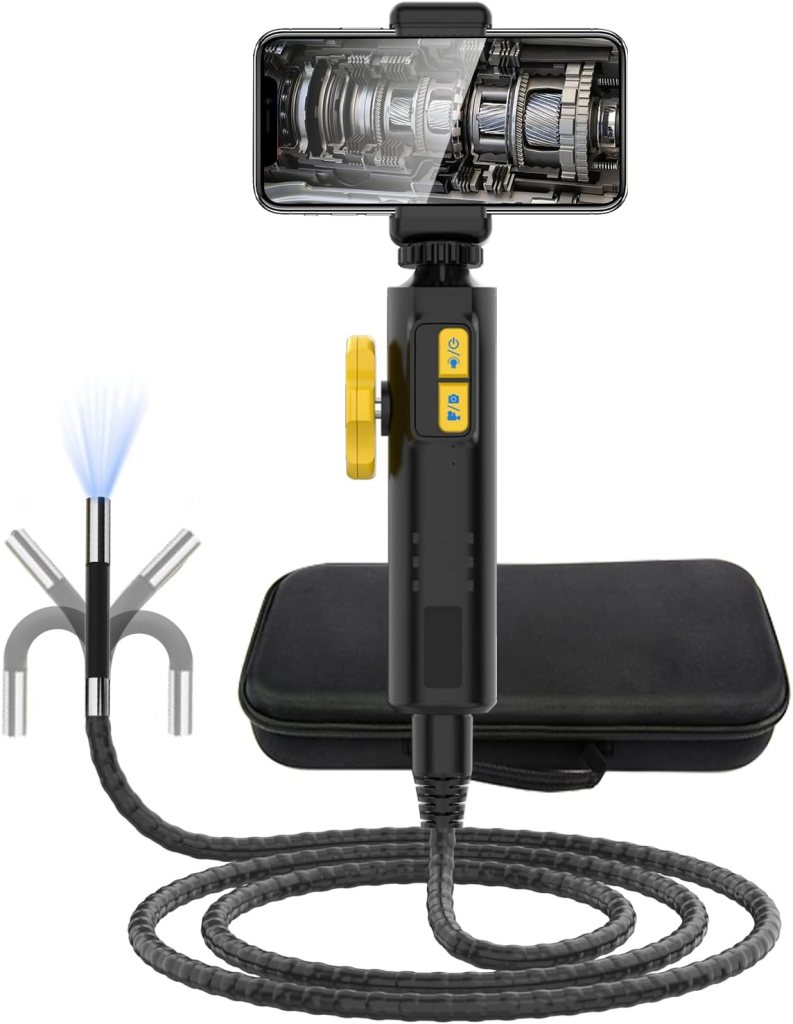
The LUTIFIX articulating borescope listing says the camera is designed for narrow and bending spaces that are hard to enter, with use cases that include machinery, pipeline work, and boiler gas inspection. That last part is the reason it belongs here. Boiler and flue-style inspection often involves awkward internal paths where a straight probe leaves too much unseen. A two-way articulating scope makes more sense than a basic fixed-lens cable.
This is not the universal recommendation. It is the specialized one. For boiler inspection, that is exactly what you want.
Review summary: The boiler-specific pick because it is designed around the kind of narrow, controlled inspection path that boiler and combustion-system work often demands.
Pros
- Built for narrow and bending spaces
- Articulation suits boiler-path inspection
- Better fit for machinery and internal channels
- More purposeful than a generic home-use scope
Cons
- Too specialized for many buyers
- Not the best casual household option
- Harder to justify if boiler inspection is not on your list
Real Testimonial
The LUTIFIX is the specialized boiler-inspection pick because it is built for narrow, bending spaces and adds a 210° articulating function plus a high-temperature alarm. That makes it a better match for boiler gas paths, machinery channels, and other awkward internal routes where a straight probe leaves too much unseen. It is more niche than the others, but that is exactly why it earns a place.
4. Anykit Dual Lens 6″ IPS Borescope
Best overall
This is the easiest recommendation in the group.
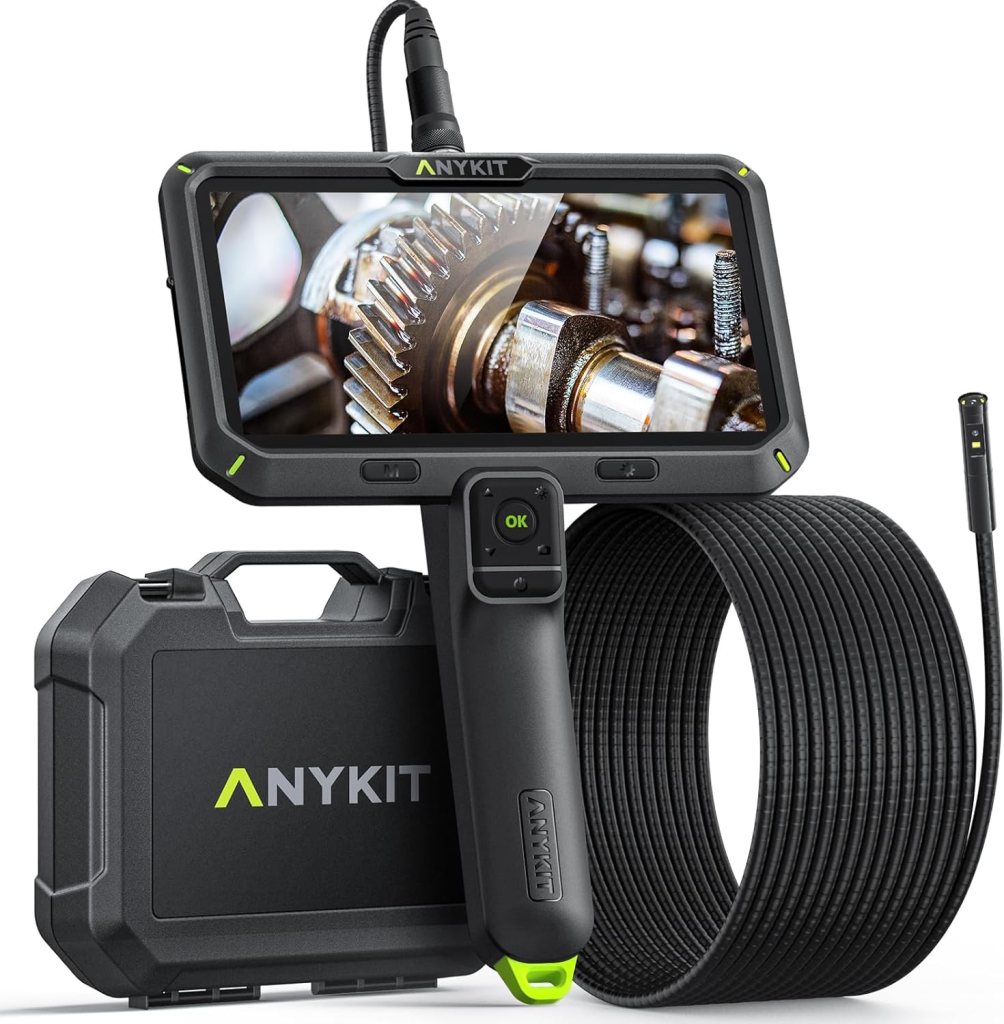
It gets the big stuff right. A built-in 6-inch IPS screen. Dual lenses. Split-screen viewing. A 16.5-foot cable. IP67 waterproofing. That is enough real utility to cover household inspections, basic plumbing checks, duct peeks, appliance gaps, and a lot of light garage work without feeling stripped down or fussy.
The built-in screen is the reason I would put this first. Phone-connected scopes sound convenient until you are juggling brightness, app permissions, cable orientation, and a dirty pair of hands. A self-contained unit is just faster.
The dual-lens setup helps too. Side viewing is not a gimmick when you are checking pipe walls, looking behind brackets, or trying to understand what is actually scraping inside a cavity. Single-lens cameras make you work harder than you need to.
Review summary: The best inspection camera here for most people. Not because it is exotic. Because it removes friction.
Pros
- Big built-in display
- Dual-lens view is genuinely useful
- Long cable for household and shop work
- Better all-around fit than phone-first models
Cons
- Bulkier than a small USB scope
- More tool bag than junk drawer
- Overkill for very occasional use
Best for
Homeowners, DIY repair work, appliance inspection, light plumbing, and anyone who wants one tool that covers the widest range of jobs.
Real Testimonial
This is the easiest all-around recommendation because it does not force a compromise too early. The 6-inch screen is large enough to be genuinely useful, and the dual-lens split-screen setup makes more sense in real inspections than it does in marketing copy. It is the one I would pick for someone who wants one inspection camera for home repairs, plumbing checks, and general troubleshooting without messing around with apps or adapters.
5. DEPSTECH 86T
Best for simple inspections
This is the one for people who want less gear, not more.
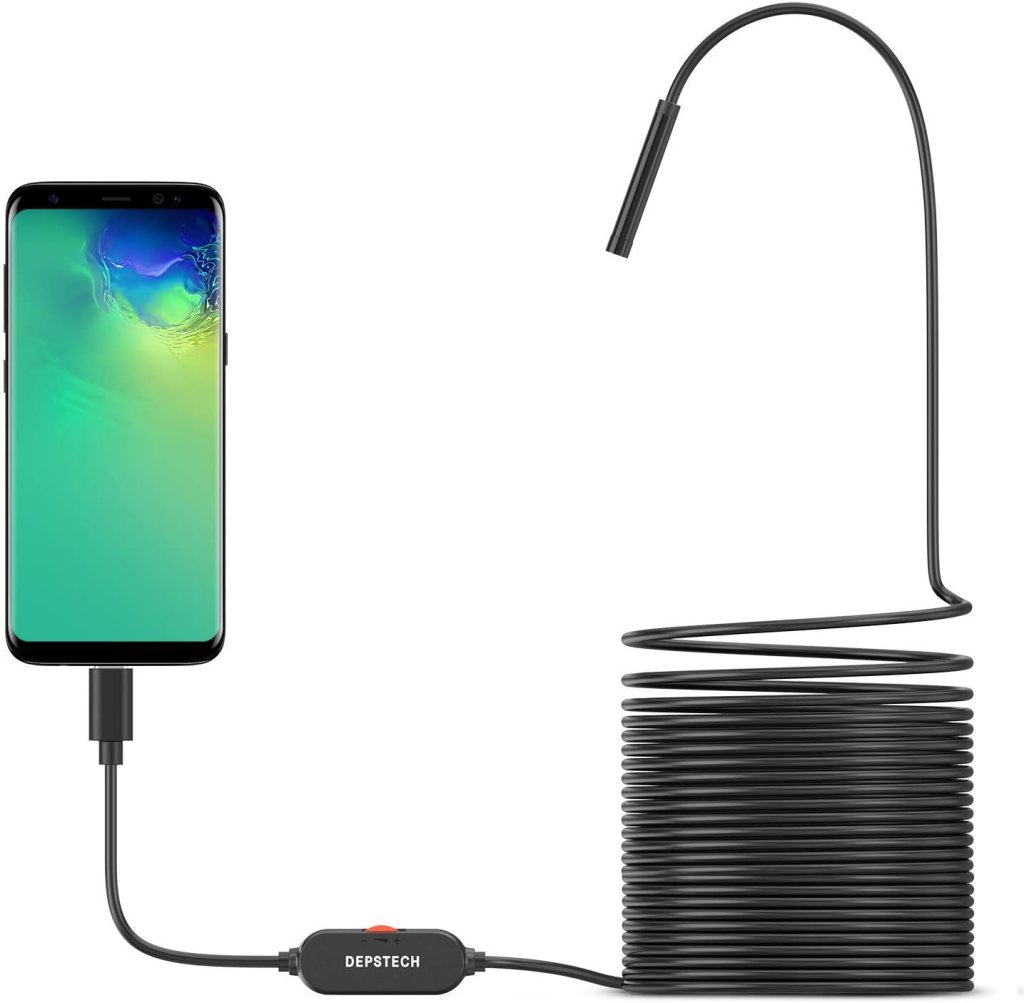
The DEPSTECH 86T sits in that useful middle ground where it is small, familiar, and easy to stash. It is a phone-connected inspection camera, so you are not carrying an extra screen, and DEPSTECH’s 86T line is established enough that accessories and compatibility references keep showing up across Amazon’s own listings and support items.
I would not make it the top pick because phone-based scopes always involve a little compromise. But there is a reason they keep selling. They are light. They take up almost no space. They are good for the kind of inspection that starts with, “I just need to see what is in there.”
That can be enough. Often it is.
Review summary: The cleanest low-drama choice if you want something compact, easy to store, and quick to pull out for occasional inspection work.
Pros
- Compact and easy to keep around
- Familiar phone-based workflow
- Good fit for occasional use
- Less hardware to carry
Cons
- Dependent on your phone
- Less self-contained than screen-based models
- Not the one I would pick for long, awkward jobs
Best for
Quick home inspections, occasional wall peeks, simple drain or appliance checks, and buyers who would rather use the screen already in their pocket.
Real Testimonial
The 86T is a good pick for simple inspections because it stays small and direct. It is not the most full-featured tool here, but the combination of a slim 720P probe, IP67 waterproofing, and long semi-rigid cable makes it useful for occasional home checks, light automotive peeks, and basic wall or drain work. This is the one for buyers who want something easy to store and easy to pull out when they need an answer fast.
6. Ralcam 4-Way 360° Articulating Borescope
Best for steering around corners
This one is for stubborn spaces.
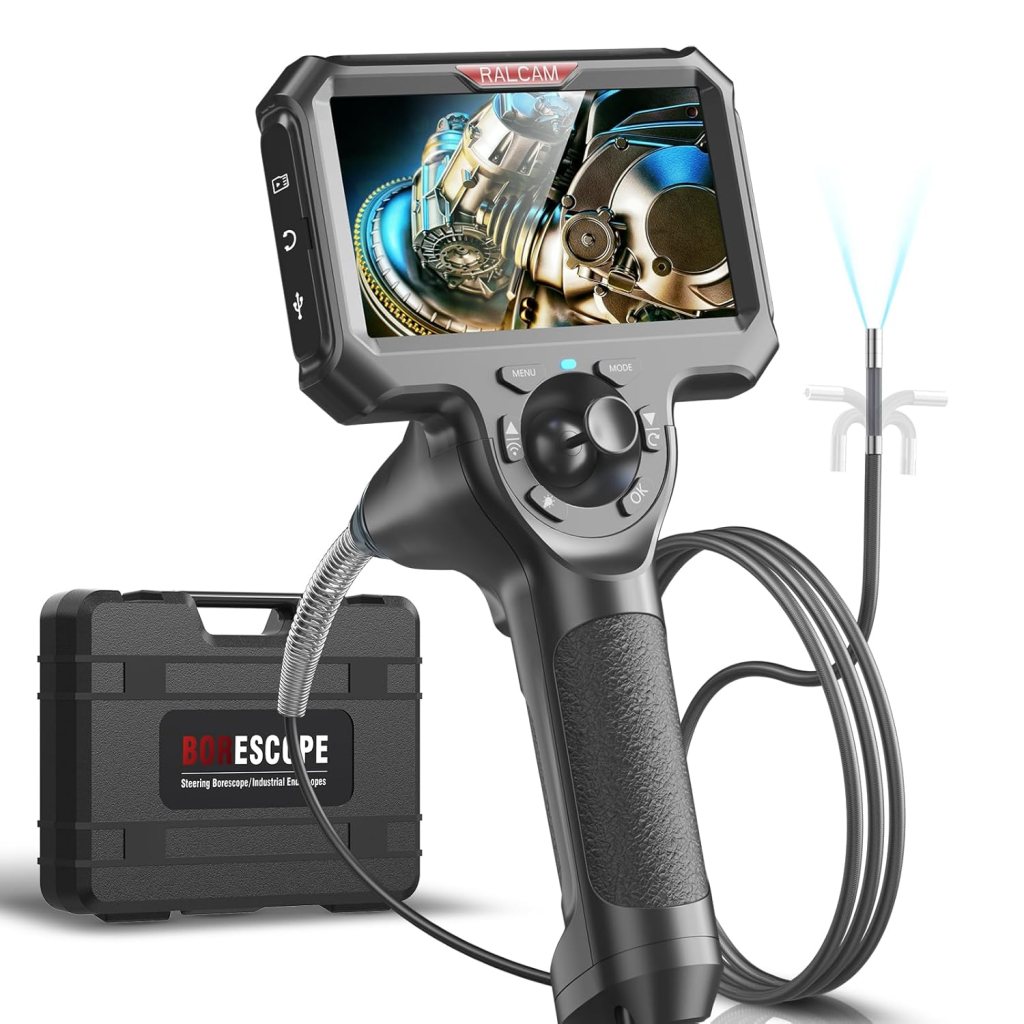
Ralcam’s articulating borescope is built around 4-way steering and full-angle viewing claims, with slim-probe listings and a built-in screen depending on the version. The common thread is directional control.
That is the reason to buy it. Not because it sounds advanced, but because some inspections are impossible with a straight-ahead probe unless you enjoy wasting your afternoon.
I would not call this the best value for a casual buyer. It is more niche than that. But the niche is real. If you need to navigate around obstacles, look back on a surface, or check an awkward cavity in equipment, it can save a lot of swearing.
That counts.
Review summary: The strongest pick here for buyers who care more about directional control than simplicity.
Pros
- Serious articulation
- Better visibility in complex paths
- Built for difficult angles
- More capable than fixed-lens scopes in cramped systems
Cons
- More complexity
- Shorter reach than some simpler long-cable models
- Not the easiest first inspection camera
Best for
Engine work, pipe inspection, HVAC, machinery, and anyone tired of seeing everything except the spot they actually need to inspect.
Real Testimonial
The Ralcam is for tougher paths and tighter spaces where a basic scope starts wasting your time. Its 4-way joystick control, waterproof 6.0mm probe, and compact screen-based design make it a better fit for mechanics, engine inspection, pipe work, and any job where steering matters more than simplicity. It is not the beginner pick, but it is the more capable one when angles are the whole problem.
7. Anykit 4.3″ Standalone Borescope Inspection Camera

Best no-app standalone option
Some people do not want another app. They do not want pairing. They do not want their phone tied to a cable while they crouch behind a washing machine.
I get it.
That is why this model makes sense. Listings for Anykit standalone borescopes push the same appeal over and over: power on, inspect instantly, no Wi-Fi, no Bluetooth, no software downloads.
That pitch is not glamorous, but it is smart. Especially for homeowners and contractors who want a grab-and-go tool.
The tradeoff is that standalone beginner-friendly scopes can be a little simpler in features. Fine. Simpler is often the point.
Review summary: The best choice for people who value speed and simplicity more than advanced articulation or phone integration.
Pros
- No app hassle
- Easy to hand to anyone
- Fastest setup in the group
- Good fit for routine inspection work
Cons
- Simpler feature set
- Some variants are lighter on recording features
- Less flexible than articulating models
Best for
Beginners, routine household troubleshooting, contractor bags, and anyone who wants an inspection camera that behaves like a tool instead of a tech project.
Real Testimonial
This one wins on convenience. Amazon’s listing makes the appeal pretty clear: no Wi-Fi, no software downloads, no pairing ritual, just a standalone device you turn on and use. It is a smart choice for homeowners, plumbers, contractors, and anyone who wants a straightforward tool that behaves like a tool, even if it gives up some advanced features along the way.
What actually matters in an inspection camera
Most buyers focus on the wrong things first.
Resolution matters, sure. But inspection cameras live or die on access, control, lighting, and how quickly you can make sense of what you are seeing. That is why industrial remote visual inspection gear is built around real-time viewing, maneuverability, and reliable imaging, not just headline specs.
Screen or phone connection is the first real fork in the road. Built-in screens are faster and less annoying. Phone-connected units are smaller and easier to stash.
Articulation is the second fork. If you inspect straight paths, fixed lens is fine. If you inspect engines, machinery, or anything with bends and obstructions, articulation is worth paying for.
Probe diameter matters more than people think. A slimmer probe gets into tighter spaces with less fuss. Cable length matters too, but only if the cable is manageable. A long awkward cable is not always better than a shorter controllable one.
Then there is waterproofing. IP ratings are not decoration. They are standardized ingress protection codes. IEC says the IP system exists to grade resistance against dust and liquids, which is exactly the kind of boring practical thing you should care about before sticking a camera into wet, dirty places. IEC’s IP ratings guide is worth a quick read.
Which type should you buy?
Buy a built-in screen model if you want the least friction.
Buy a phone-connected model if storage space matters and your inspections are occasional.
Buy a two-way articulating borescope if you work on vehicles or equipment and keep missing the angle you need.
Buy a 4-way articulating borescope if the spaces you inspect are awkward enough to justify a more capable tool.
That is the whole decision tree. It is not complicated once you stop looking at the category like a wall of identical probes.
Conclusion
The Anykit Dual Lens 6″ IPS Borescope is the best overall pick because it covers the broadest range of real-world jobs without asking you to fight the tool.
The DEPSTECH 86T is the smarter simple pick if you want something light and easy to keep around.
The Teslong USB-C Two-Way Articulating Borescope is the one I would steer toward for automotive and mechanical work.
And if you already know angles are your problem, the Ralcam 4-Way 360° Articulating Borescope earns its place fast.
One last thing. Do not treat “waterproof” as vague marketing fog. Check the actual IP rating and think about the kind of dirt, moisture, and access your jobs involve. That matters more than flashy copy. IEC’s explanation of IP ratings is the right place to ground that decision.
FAQ
What is the best inspection camera for home use?
For most homes, the Anykit Dual Lens 6″ IPS Borescope is the best fit because it combines a built-in screen, dual-lens viewing, long cable reach, and IP67 protection in one self-contained tool.
What is the best inspection camera for plumbing?
For casual plumbing checks, a built-in screen model with IP67 protection and decent cable length makes the most sense. The Anykit Dual Lens 6″ IPS Borescope is the strongest general pick here.
What is the best inspection camera for automotive work?
The Teslong USB-C Two-Way Articulating Borescope stands out because the articulating tip helps you inspect curved or obstructed mechanical spaces more precisely than a fixed-lens model.
Is an articulating borescope worth it?
Yes, if you inspect engines, machinery, HVAC systems, or tight paths with bends. No, if you mostly inspect straight, open cavities.
Do I need a dual-lens inspection camera?
Not always. Dual-lens viewing helps when you need to see forward and sideways during the same inspection. It is especially useful in pipes, cavities, and behind mounted components.
What probe diameter is best for tight spaces?
Slimmer is usually better, provided the probe still feels controllable. Many popular consumer inspection cameras now sit around the 5.5mm to 6.5mm range on narrower models.
Are inspection cameras waterproof?
Many are water-resistant to a rated standard, often IP67, but you should always confirm the listing before use in wet areas.
What does IP67 mean on an inspection camera?
IEC’s IP system grades resistance to dust and liquids. IP67 means strong dust protection and temporary immersion protection under the standard’s test conditions.
Is a standalone inspection camera better than a phone-connected one?
Usually, it is better for convenience. Phone-connected models are smaller, but standalone models are faster to use and easier to hand off during a job.
Can an inspection camera look inside walls?
Yes, if there is an access point. Inspection cameras are widely used for confined-space visual checks where direct line of sight is not possible.
Can you use an inspection camera in a drain pipe?
Yes, as long as the model’s probe and waterproof rating are suitable for the job. IP ratings matter here.
Are wireless inspection cameras better than wired ones?
Not necessarily. Wired probes are often more stable and direct. Wireless convenience can be nice, but it is not automatically better for inspection work.
What is the difference between a borescope and an endoscope camera?
In consumer tool listings, the terms are often used loosely and interchangeably. In broader inspection language, both refer to camera-based tools for visual inspection of hard-to-reach spaces.
Do inspection cameras record photos and video?
Many do, but not all. Some standalone models record, some do not, and some phone-connected models rely on the paired device. Always check the listing.
How long should the cable be on an inspection camera?
For general home use, around 5 to 16.5 feet covers most common jobs. Longer is not always better if the cable becomes hard to manage.
Which inspection camera is easiest for beginners?
The Anykit 4.3″ Standalone Borescope is the easiest beginner pick because it avoids app setup and starts as a self-contained tool.
Are lower-cost inspection cameras good enough for occasional use?
Yes, sometimes. If your jobs are simple and infrequent, a compact model like the DEPSTECH 86T can be enough. You do not always need articulation and a built-in display.
What should you avoid when buying an inspection camera?
Avoid buying on headline specs alone. Focus on screen type, articulation, cable usability, probe diameter, and IP rating instead.
Affiliate Disclaimer
This article contains affiliate links. We may earn a small commission if you purchase through these links, at no extra cost to you.




Leave a Reply