I don’t think small business security cameras should be cute. They should record clearly, survive bad weather, store footage without making you chase subscription plans, and show you the thing you actually need to see.
That sounds obvious until you look at how many cameras are built for porches, pets, and package alerts instead of doors, counters, stock rooms, service bays, alleys, and small parking areas.
This review is built around 5 small business security cameras that make sense for different types of business spaces. I looked at camera specs, installation style, recording options, storage, resolution, field of view, weather ratings, smart detection, buyer review patterns, and the kind of problems small business owners actually care about.
Security is not only about cameras. CISA’s small and medium-sized business resources point business owners toward broader security planning, including practical preparation around business risks, response planning, and security habits.
Cameras are one part of that stack, but they are often the part owners finally deal with after something goes missing. Better to fix it before that happens.
Quick Picks
- ANNKE 4K PoE Security Camera System: Best Overall for Small Business Coverage
Best for owners who want a reliable wired system with local recording, strong detail, and room to expand. - Reolink E1 Zoom: Best for Offices, Counters, and Indoor Monitoring
Best for reception areas, counters, small offices, stock rooms, and indoor spaces where flexible viewing matters. - ANNKE H500 3K PoE Security Camera System: Best for 24/7 Local Recording Across More Angles
Best for businesses that need more camera positions across doors, storage areas, hallways, and exterior points. - Reolink Duo 3 PoE: Best for Wide Entrances, Parking Areas, and Loading Zones
Best for broad outdoor spaces where one narrow camera leaves too many blind spots. - Reolink Solar Floodlight Cam: Best for Deterrence Without Running Cable
Best for side gates, dark walkways, detached storage areas, and exterior spots where light is part of the security plan.
Related articles
- 5 Best Wired (PoE) Security Camera Systems (REVIEWED & TESTED)
- 5 Best Farm Cameras for Rural Security (Reviewed & Tested)
- 8 Best REOLINK Cameras (Buyer’s Guide)
How I Chose These Cameras
I did not choose these like a casual homeowner would.
A small business camera has to work harder. A retail shop needs a clean view of the counter. A warehouse needs door coverage. A small office may need one discreet indoor camera and one serious outdoor camera. A contractor yard needs deterrence at night. A restaurant may need storage-room coverage, rear-door coverage, and something pointed at the register.
So I gave more weight to:
- Reliable recording
- Local storage options
- Night visibility
- Weather resistance
- Field of view
- Smart person and vehicle detection
- Installation difficulty
- Business usefulness
- Review patterns from real buyers
The big split is wired versus wireless. Wired PoE systems are less fun to install, but they feel more serious once they’re running. Wireless cameras are easier to place, but the business owner has to think harder about Wi-Fi, battery, power, storage, and blind spots.
Comparison Table: Camera Type and Best Use
| Product | Type | Best Use |
|---|---|---|
| ANNKE 4K PoE Security Camera System | Wired PoE NVR kit | Best overall small business system |
| Reolink E1 Zoom | Indoor Wi-Fi PTZ camera | Office, counter, or stock room |
| ANNKE H500 3K PoE Security Camera System | Wired PoE NVR kit | More cameras and broader coverage |
| Reolink Duo 3 PoE | Wired PoE panoramic camera | Wide outdoor view |
| Reolink Solar Floodlight Cam | Solar Wi-Fi floodlight camera | Deterrence and hard-to-wire spots |
Comparison Table: Recording Style and Tradeoffs
| Product | Recording Style | Main Tradeoff |
|---|---|---|
| ANNKE 4K PoE Security Camera System | NVR, 24/7 capable | Takes more effort to install |
| Reolink E1 Zoom | Local or hub/NVR-compatible setup | Indoor only |
| ANNKE H500 3K PoE Security Camera System | NVR, 24/7 capable | More cameras to place correctly |
| Reolink Duo 3 PoE | 24/7 capable with compatible setup | Needs PoE wiring |
| Reolink Solar Floodlight Cam | Event-based outdoor recording | Not my first choice for full-time recording |
1. ANNKE 4K PoE Security Camera System

Best Overall for Small Business Coverage
The ANNKE 4K PoE Security Camera System is my first pick because it behaves like a business system, not a clever little camera. You get an 8-channel NVR, four 8MP turret cameras, H.265+ recording, audio recording, IP67 weather resistance, smart dual light, human and vehicle detection, and a 2TB hard drive. The listing also shows a 4.3-star rating from 222 buyer reviews at the time I checked.
That mix matters.
Four cameras are enough for many small businesses to cover the front door, rear door, counter area, and one exterior angle. The 8-channel NVR gives room to add more later, which I like.
A lot of owners start with too little coverage, then realize the camera caught the person walking in but not the car, plate, side gate, register, or storage shelf.
This system is not the easiest option in the article. PoE means cable runs. You need to think about mounting height, cable routing, NVR placement, and where your monitor or app access will live. But once it is installed, it gives you the kind of always-on setup I prefer for a business.
The buyer review pattern is what I would expect from this category: people like the clarity and value, while some complaints tend to cluster around setup details, app expectations, and the normal friction of installing a wired system. That feels believable. Wired systems reward planning.
Review Summary
This is the one I would start with for a shop, small office, garage, clinic, service business, or light commercial property where 24/7 recording matters. The image quality and NVR setup make it more dependable than a single Wi-Fi camera trying to do too much.
What I Like
- 4K resolution gives you more useful detail than basic 1080p cameras.
- PoE wiring keeps power and data on one cable.
- NVR storage avoids relying only on cloud clips.
- Human and vehicle detection helps reduce junk alerts.
- IP67 weather resistance makes the cameras viable outside.
What I Do Not Love
This is not a five-minute install. If you hate ladders, cable routing, and drilling, you may want help. I also would not treat the four included cameras as a full solution for every business. Some storefronts and yards need six or eight angles.
Best Business Uses
- Retail storefronts
- Garages and service bays
- Small warehouses
- Offices with exterior doors
- Businesses that want local recording
- Owners who want to add cameras later
Pros
- Best all-around business fit
- Strong detail from 8MP cameras
- Local NVR recording
- Good outdoor durability
- Expandable 8-channel setup
Cons
- Requires cable planning
- More involved than wireless cameras
- Four cameras may not be enough for larger spaces
Verdict
This is my best overall pick because it solves the core business problem: reliable coverage with local recording. It is not flashy. Good. I don’t want flashy from a business camera. I want footage that is there when I need it.
Real Testimonial
Buyer feedback is strongest around image clarity, wired PoE reliability, and the comfort of having local NVR recording. Owners seem to like it most when they need several fixed views across doors, driveways, shops, or exterior areas.
The main criticism is setup. This is not a quick wireless install. Buyers who are comfortable running cable tend to report a better experience than those expecting plug-and-play simplicity.
2. Reolink E1 Zoom

Best for Offices, Counters, and Indoor Monitoring
The Reolink E1 Zoom is the second pick because it gives small businesses a clean indoor option without turning the office into a surveillance bunker. It supports person, pet, and crying sound detection, though only two detection modes can be active at the same time.
Reolink also says the E1 Zoom is designed for indoor use only, which is important. Do not try to make this an outdoor camera under an awning and hope for the best.
For small business use, I like this camera near a counter, reception desk, office entrance, storage room, or point where employees need visibility but you do not need a full NVR kit. The pan-and-tilt design gives more flexibility than a fixed indoor camera.
The zoom helps if the camera sits farther from the thing you care about.
The review pattern is generally positive around image quality and ease of use, while the tradeoffs are predictable. It is still a Wi-Fi indoor camera. That means placement, signal strength, and privacy expectations matter.
This is not the camera I would use to guard a back alley. It is not the camera I would trust as the only recorder in a store. But for interior business monitoring, it makes sense.
Review Summary
The E1 Zoom is the right pick for indoor visibility. It feels practical for an office, counter, lobby, stock room, or small reception area where you want a camera that does not require a full wiring project.
What I Like
- Indoor pan-and-tilt coverage gives you more flexibility.
- Zoom helps with counters, shelves, and entry points.
- Smart detection is useful for basic monitoring.
- Compact design makes it less awkward inside a business.
- Good fit for smaller rooms where a fixed camera may feel too limited.
What I Do Not Love
It is indoor only. That is not a small detail. Small business owners often try to stretch one camera into every role. Don’t do that here. Use it where it belongs.
Best Business Uses
- Reception desks
- Sales counters
- Office entrances
- Stock rooms
- Small back offices
- Waiting areas
Pros
- Strong indoor flexibility
- Good for counters and rooms
- Pan, tilt, and zoom
- Cleaner install than a wired system
- Useful as a second or third camera
Cons
- Indoor only
- Wi-Fi quality matters
- Not ideal as the main business camera
Verdict
This is the best pick in the article for indoor business monitoring. I would pair it with a stronger outdoor or PoE system rather than asking it to carry the whole security plan.
Real Testimonial
Buyers commonly praise the Reolink E1 Zoom for indoor convenience, flexible viewing, and solid image quality for a compact camera. The pan, tilt, and zoom features make it useful for offices, counters, stock rooms, and small interior spaces.
The limitation is clear: it is an indoor camera. Review patterns suggest buyers are happiest when they use it for room-level monitoring, not outdoor coverage or full-business security.
3. ANNKE H500 3K PoE Security Camera System
Best for 24/7 Local Recording Across More Angles
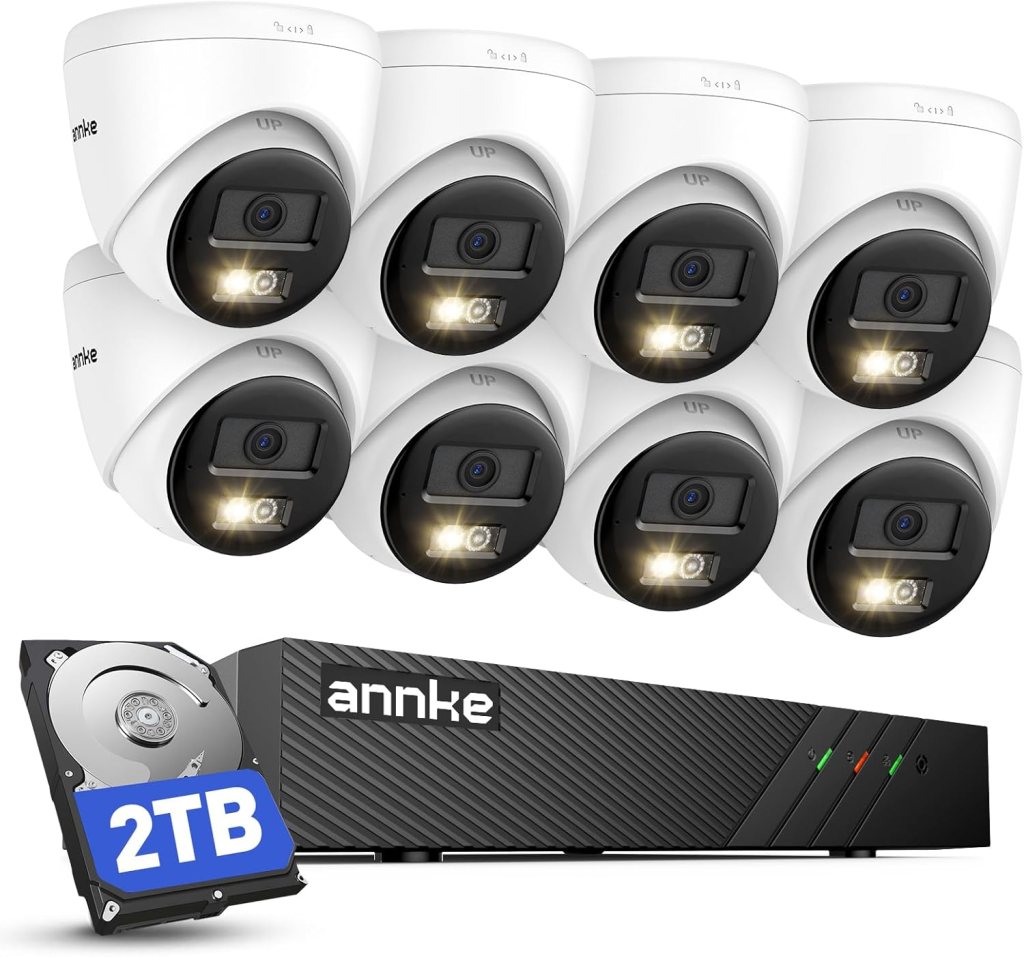
The ANNKE H500 3K PoE Security Camera System is the pick for owners who already know four cameras will not be enough. This system includes an 8-channel NVR, eight 5MP outdoor IP cameras, AI detection, 2TB HDD storage for 24/7 recording, two-way audio, color night vision, and IP67 weather resistance. The listing showed a 4.3-star rating from 74 buyer reviews when checked.
This is where the article gets more serious.
Eight cameras can cover a small property much better than four. You can watch the entrance, counter, rear door, side alley, stock area, office hallway, loading space, and parking angle without making one camera do three jobs. That is usually how footage becomes useful. Not because the camera is magical, but because it is pointed at the right thing.
The 3K resolution is not as sharp as the 4K ANNKE system above, but the extra camera count may matter more depending on the property. I would rather have eight well-placed 3K cameras than four 4K cameras with blind spots everywhere.
The red and blue light alarm is a matter of taste. Some owners will like the extra deterrence. Others may find it too aggressive for customer-facing spaces. I would use those features carefully.
Review Summary
This is the better ANNKE pick for businesses that need more angles immediately. It fits small warehouses, equipment-heavy shops, offices with multiple entry points, and properties where exterior coverage matters.
What I Like
- Eight cameras let you build a more complete layout.
- 2TB NVR storage supports serious recording.
- AI detection helps filter human and vehicle activity.
- Two-way audio adds practical communication.
- IP67 weather resistance suits outdoor placement.
What I Do Not Love
The more cameras you have, the more placement mistakes you can make. This system rewards a good plan. Before installing, walk the property during the day and at night. Look for glare, shadow, signage, delivery routes, and employee-only areas.
Best Business Uses
- Small warehouses
- Auto shops
- Contractor offices
- Retail properties with multiple doors
- Storage-heavy businesses
- Light commercial buildings
Pros
- More complete coverage
- 24/7 local recording
- Eight-camera kit
- Good for outdoor and indoor edges
- Strong value for multi-angle monitoring
Cons
- Bigger installation job
- 3K instead of 4K
- Alarm features may not fit every setting
Verdict
This is the one I would choose if camera count matters more than maximum resolution. For many small businesses, it does.
Real Testimonial
Buyer feedback favors the broader coverage. The eight-camera setup is the main appeal for people who want more angles, local recording, and outdoor-ready cameras in one package.
The tradeoff is installation. More cameras mean more planning, more cable, and more chances to choose a bad angle. Buyers who plan the layout first tend to get more value from the system.
4. Reolink Duo 3 PoE
Best for Wide Entrances, Parking Areas, and Loading Zones
The Reolink Duo 3 PoE solves a problem I see constantly: one narrow camera pointed at a wide area. That usually gives you a nice view of the wrong thing.
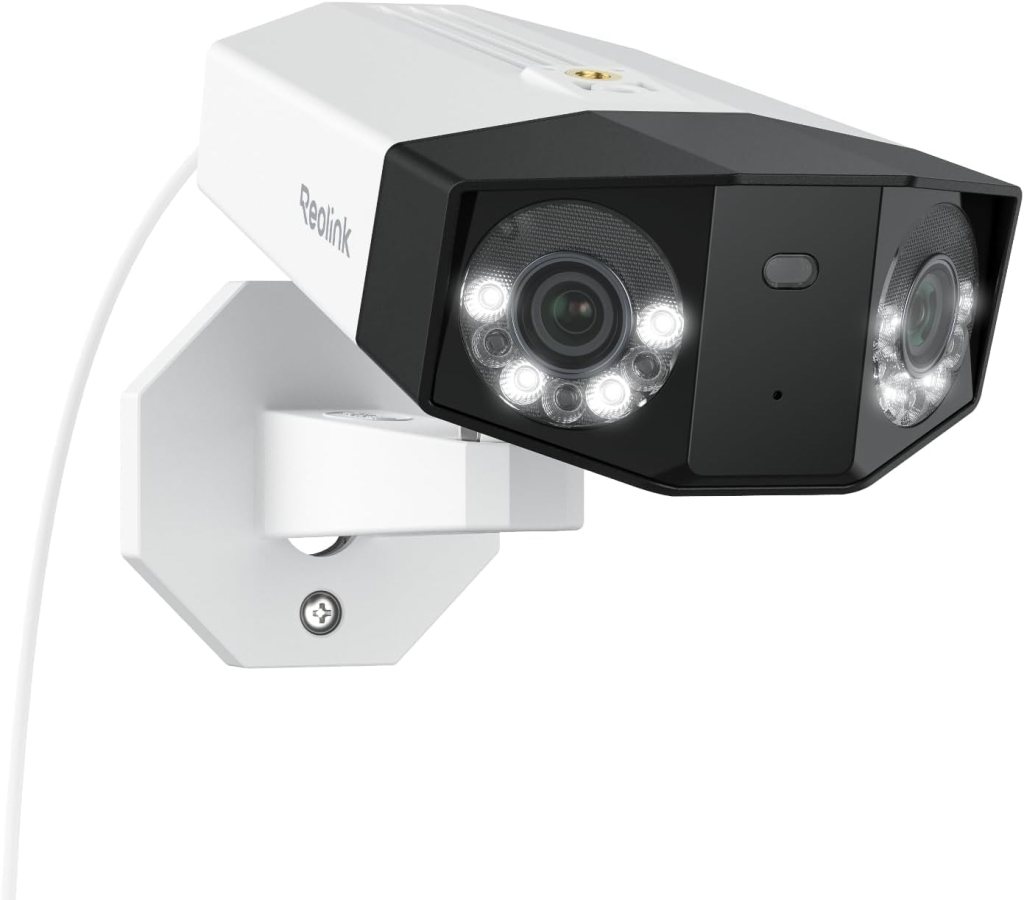
The Duo 3 PoE uses two 4K image sensors for a 16MP dual-lens image and a 180-degree panoramic view. Its listing highlights color night vision, person, vehicle, and animal detection, two-way talk, motion track, and support for 24/7 recording with a compatible setup.
This is not the camera I would put over a small office desk. It is too specialized for that. I like it for wide entrances, front approaches, loading areas, fenced lots, shop aprons, and exterior walls where one normal camera leaves too many blind spots.
The wide view is the point. Instead of installing two separate cameras to cover left and right, you can use one camera to see the whole sweep. That can be excellent on a storefront exterior or parking pad.
But I would not use it as my only camera. Wide cameras can show a lot, but they do not always give the same close detail as a tighter camera aimed at one door, register, or plate-reading angle. Use it to understand movement across an area. Pair it with tighter cameras for identification.
Review Summary
The Duo 3 PoE is the best pick here for wide outdoor business coverage. It is especially useful where people or vehicles move across a broad area rather than straight toward a single door.
What I Like
- 180-degree panoramic view reduces blind spots.
- 16MP dual-lens image gives more usable detail than many wide cameras.
- PoE connection fits serious installations.
- Smart detection helps sort people, vehicles, and animals.
- Two-way talk can help with deliveries or exterior interactions.
What I Do Not Love
Wide views are not magic. Mounting height and angle matter. Too high, and you get heads and hoods. Too low, and someone can reach it. The sweet spot depends on the property.
Best Business Uses
- Parking areas
- Loading zones
- Exterior walls
- Wide storefronts
- Gated entries
- Equipment yards
Pros
- Excellent wide-area coverage
- Great for reducing blind spots
- PoE reliability
- Strong outdoor business fit
- Useful motion tracking
Cons
- Needs wiring
- Not ideal for tight indoor rooms
- Should be paired with focused cameras
Verdict
This is a smart camera for the parts of a property where normal cameras feel too narrow. I would use it as a wide-area specialist, not a whole security system.
Real Testimonial
Buyers like the Reolink Duo 3 PoE for its wide panoramic view. The main praise centers on covering broad areas where a normal camera feels too narrow, such as entrances, parking areas, loading zones, and exterior walls.
The balanced takeaway is that wide coverage does not replace targeted coverage. It works best as a specialist camera, not the only camera watching a business.
5. Reolink Solar Floodlight Cam
Best for Deterrence Without Running Cable
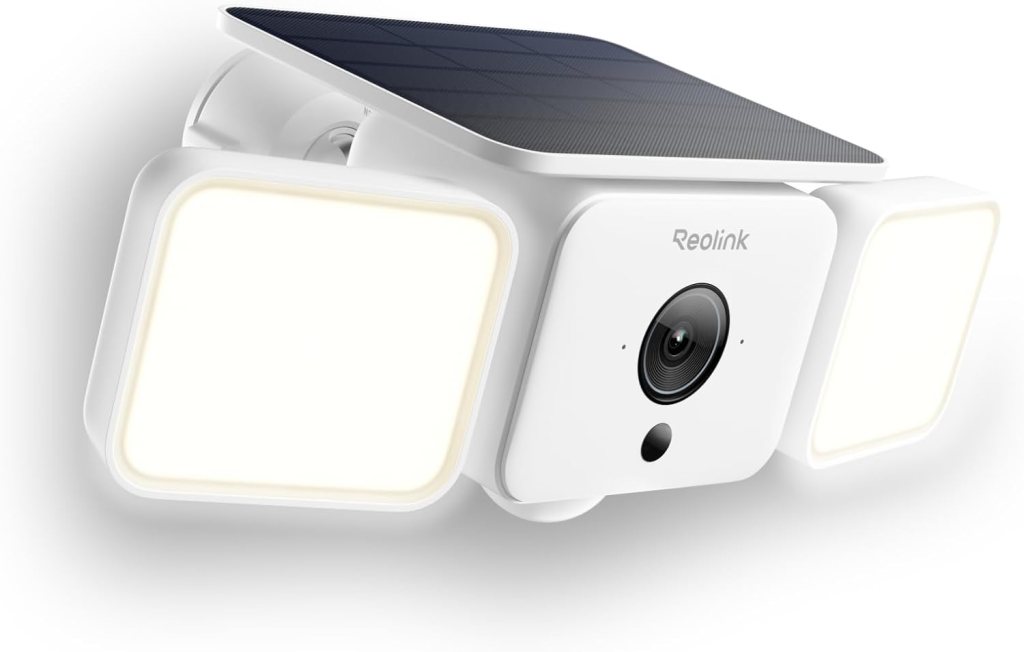
The Reolink Solar Floodlight Cam is the camera I would use where deterrence matters more than perfect surveillance. Its listing describes a 2K camera with a 150-degree view, up to 1000 lumens of adjustable lighting, siren alerts, color night vision, Wi-Fi 6, and AI detection for people, vehicles, and animals.
This is a different kind of small business camera.
A floodlight camera changes behavior. People notice lights. They notice sirens. They notice a camera staring at the side gate or rear door. For a business with a detached shed, side alley, outdoor storage corner, or secondary entrance, that can matter.
I would not make this the backbone of a business security setup. Solar and Wi-Fi are convenient, but they bring variables. Sun exposure, Wi-Fi signal, weather, mounting angle, and event recording all affect the experience.
That said, this camera has a real role. Some areas are too annoying to wire. Some exterior spots only need a visible warning, motion-triggered light, and a clip when someone walks through. For that job, this makes sense.
Review Summary
The Reolink Solar Floodlight Cam is best as a deterrence layer. It is not the camera I would use for a register, office, or main 24/7 recording system. It belongs outside, watching the places people should not casually wander through.
What I Like
- Solar power helps avoid cable runs.
- Floodlight deterrence is useful for dark exterior areas.
- Siren alerts can make a camera feel less passive.
- 150-degree view covers a decent outdoor area.
- AI detection helps reduce useless motion alerts.
What I Do Not Love
Solar cameras need good placement. Shade, weak Wi-Fi, and bad mounting angles can ruin the experience. I also prefer wired systems for any camera that must record constantly.
Best Business Uses
- Side gates
- Alleys
- Detached storage areas
- Outdoor equipment spaces
- Rear entrances
- Dark walkways
Pros
- Visible deterrence
- No major wiring project
- Good for awkward outdoor spots
- Floodlight plus camera in one unit
- Useful for motion-triggered alerts
Cons
- Not my first choice for 24/7 recording
- Depends on sun and Wi-Fi
- Better as a support camera than a main system
Verdict
This is the best deterrence pick. Use it where the light itself is part of the security strategy.
Real Testimonial
Buyer feedback is strongest around deterrence. People like the mix of camera, floodlight, siren, solar power, and motion alerts for dark outdoor areas.
The limitation is that solar and Wi-Fi depend heavily on placement. It is best for side gates, walkways, detached storage areas, or exterior spots where running cable is not practical.
Which Camera Should You Buy First?
If I were starting from zero, I would buy the ANNKE 4K PoE Security Camera System first. It gives the best balance of clarity, reliability, local storage, and business-style coverage.
If the business already has exterior coverage and only needs an indoor camera, I would choose the Reolink E1 Zoom. It is a tidy solution for offices, counters, and stock rooms.
If the property has multiple doors, a yard, storage areas, or several customer and employee paths, I would choose the ANNKE H500 3K system. More cameras beat prettier specs when blind spots are the real problem.
If one outdoor area is too wide for a normal camera, I would add the Reolink Duo 3 PoE.
If one dark, awkward outdoor area needs light and a visible warning, I would add the Reolink Solar Floodlight Cam.
What Small Businesses Usually Get Wrong With Security Cameras
They Buy Too Few Cameras
One camera at the front door feels useful until something happens near the side entrance. Most businesses need layers: entry, exit, cash area, storage, and exterior movement.
They Ignore Lighting
Night footage is where bad camera plans fall apart. Test the view after dark. Look for glare, deep shadows, reflective signs, headlights, and bright streetlights.
They Put Cameras Too High
High cameras see the scene. Lower, well-angled cameras see faces, hands, plates, and actions. You need both sometimes.
They Forget About Storage
A camera is only as useful as the footage you can find. Local NVR storage is still my preference for many businesses because it keeps recording under your control.
They Trust Motion Alerts Too Much
Motion alerts help, but they should not replace recording. A missed alert is annoying at home. At a business, it can cost you evidence.
They Skip Privacy Rules
Do not put cameras in bathrooms, changing areas, private employee spaces, or anywhere customers and workers reasonably expect privacy. Audio recording laws can also be stricter than video rules depending on location. Treat that carefully.
FAQ
What are the best small business security cameras?
The best small business security cameras are the ones that match the space. For most owners, I would start with the ANNKE 4K PoE Security Camera System because it offers strong resolution, local NVR recording, outdoor durability, and room to expand. For indoor monitoring, the Reolink E1 Zoom makes more sense. For wide outdoor areas, the Reolink Duo 3 PoE is the better specialist.
How many security cameras does a small business need?
Many small businesses need at least four cameras: one for the front entrance, one for the rear entrance, one for the cash or reception area, and one for exterior movement. Larger spaces may need eight or more. Count the doors first. Then count the areas where money, inventory, equipment, or vehicles sit.
Are wired cameras better for a small business?
Usually, yes. Wired PoE cameras are better when you want stable power, reliable recording, and fewer Wi-Fi problems. They take more effort to install, but they are often worth it for business use.
Are wireless cameras good enough for a shop or office?
Wireless cameras can be good enough for indoor rooms, small offices, and secondary coverage. I would not rely on one wireless camera as the only security camera for a serious business location. Wi-Fi strength, power, and storage all matter.
Should a small business use PoE cameras?
PoE cameras are a strong choice for small businesses because one cable handles both power and data. That makes them cleaner than old-school wired setups and more reliable than many Wi-Fi cameras.
Do small business security cameras need monthly fees?
No. Many cameras and NVR systems can record locally without a required monthly plan. Some brands offer cloud plans, but local storage is often the better fit for business owners who want control over footage.
What is better for a business, NVR or cloud storage?
For most small businesses, I prefer NVR storage. It supports 24/7 recording, keeps footage local, and does not depend entirely on cloud subscriptions. Cloud storage can still help for backup clips or remote access, but I would not want it to be the only layer.
Can security cameras record 24/7?
Yes, many wired PoE systems can record 24/7 to an NVR. Battery or solar cameras usually lean more toward event-based recording, though some newer models support longer recording modes under certain conditions.
What camera should I use for a cash register?
Use an indoor camera with a clear angle on the register area, but do not point it only at the employee’s head. You want hands, counter activity, and the customer side of the interaction. The Reolink E1 Zoom can work well indoors if the placement is right.
What camera should I use for a parking lot?
For a small parking area, I like a wide outdoor camera such as the Reolink Duo 3 PoE. For plates, you may need a tighter camera angle with better placement. Wide coverage and plate detail are not always the same thing.
What camera should I use for a warehouse door?
Use a wired PoE camera with 24/7 recording. Warehouse doors are too important for weak Wi-Fi or event-only clips. The ANNKE systems make more sense here than a small indoor camera.
What camera should I use for a small office?
For a small office, the Reolink E1 Zoom is a clean indoor pick. If the office has exterior doors, add a wired outdoor camera or a PoE system for better entrance coverage.
Are floodlight cameras good for businesses?
Floodlight cameras can be very good for deterrence. They are especially useful near side doors, storage areas, and dark exterior paths. I would not use one as the main recording system for a whole business.
Is 4K worth it for small business security cameras?
Yes, 4K can be worth it if the camera is placed correctly. Higher resolution helps with detail, but it cannot fix a bad angle. A well-placed 3K camera may beat a badly placed 4K camera.
What matters more, resolution or camera placement?
Camera placement matters more. Resolution helps after the camera is already pointed at the right thing. If the angle is wrong, a sharper image just gives you a clearer view of the wrong area.
Can I mix indoor and outdoor business cameras?
Yes. In fact, many businesses should. Use outdoor-rated cameras for entrances, lots, alleys, and loading areas. Use indoor cameras for counters, offices, stock rooms, and customer-facing spaces.
Do business security cameras need audio?
Not always. Audio can help, but it also raises legal and privacy questions. Before using audio recording in a business, check local rules and think carefully about where the camera is placed.
Are security cameras legal for small businesses?
Security cameras are generally allowed in many business areas, but privacy rules matter. Do not install cameras in bathrooms, changing rooms, or private spaces. Audio recording may require additional consent depending on the location.
Where should I not place business security cameras?
Do not place cameras in bathrooms, changing areas, locker rooms, or anywhere people reasonably expect privacy. Also avoid angles that capture neighboring private property more than necessary.
What is the best no-subscription security camera for small businesses?
A PoE NVR system is usually the best no-subscription route. The ANNKE 4K PoE Security Camera System and ANNKE H500 3K PoE Security Camera System both fit that style because they focus on local recording rather than cloud-first monitoring.
Final Recommendation
My top pick is the ANNKE 4K PoE Security Camera System. It gives small business owners the best mix of image quality, local recording, outdoor durability, smart detection, and expansion room.
The Reolink E1 Zoom is the better indoor add-on. The ANNKE H500 is the better multi-camera layout. The Reolink Duo 3 PoE is the wide-view specialist. The Reolink Solar Floodlight Cam is the deterrence pick.
The real answer is not “buy the fanciest camera.” It is build a layout that covers the parts of the business where things actually happen. Doors. Counters. Inventory. Vehicles. Dark exterior paths. Delivery areas. That is how 5 small business security cameras turn into a real security plan instead of a box of electronics.
The FTC’s business security guidance is a useful reminder that security should be treated as an ongoing process, not a one-time purchase. Cameras help, but owners still need good passwords, controlled access, current software, and a plan for handling incidents.
Affiliate Disclaimer
This article contains affiliate links. We may earn a small commission if you purchase through these links, at no extra cost to you.




Leave a Reply