
The phrase the best document camera for teachers sounds simple until you start sorting through the junk. A lot of these cameras look good on paper and then fall apart in the details. Slow focus. Weird software. Dim lighting. Arms that drift. That kind of thing.
For teachers, the right document camera is not the one with the loudest spec sheet. It is the one that shows handwriting clearly, handles books and worksheets without fuss, and switches from one lesson format to the next without creating friction.
Tech & Learning makes the same basic point in its buying guide, especially around real classroom use, OCR, and the difference between connection types.
This list leans practical. I picked models that make sense for live instruction, screen sharing, demonstrations, and the everyday messiness of teaching.
What actually matters in a document camera for teaching
A few features matter more than the rest.
Fast autofocus matters because teachers move quickly. You are not filming a product demo. You are flipping pages, underlining lines, holding up student work, and sometimes showing a 3D object for ten seconds before moving on.
A decent capture area matters too. If a camera can handle A3 or a broad worksheet spread, it gives you more room to work and fewer awkward repositioning moves. That is one reason larger-view models tend to feel better in actual classrooms.
Connection type matters more than most roundup articles admit. USB is fine for teachers who present from a laptop. HDMI is better when you want a direct connection to a projector or large display without routing everything through a computer.
That flexibility is a real advantage in shared classrooms and mixed setups.
Built-in lights and microphones are nice extras, but they are not dealmakers by themselves. Good focus and clear image rendering still matter more.
Related articles
Quick comparison table
| Product | Best for | Connection | Standout strength |
|---|---|---|---|
| IPEVO VZ-R | best overall | USB, HDMI | flexible classroom setup |
| HUE HD Pro | simple everyday teaching | USB | easy to use and portable |
| INSWAN INS-2 4K | sharp image quality | USB | 13MP and A3 capture |
| JOYUSING V500S | hybrid teaching | USB | autofocus plus built-in mic and light |
| CZUR Fancy S Pro | scanning and presenting | USB | multi-use workflow |
| Product | Main drawback | Best fit |
|---|---|---|
| IPEVO VZ-R | not the newest sensor in its class | teachers using projector and laptop workflows |
| HUE HD Pro | not the sharpest image here | teachers who want simple setup |
| INSWAN INS-2 4K | more feature-heavy than some teachers need | teachers who care about image quality |
| JOYUSING V500S | image is solid, not class-leading | hybrid and remote lessons |
| CZUR Fancy S Pro | more niche if you only present documents | teachers who also scan and record |
1. IPEVO VZ-R
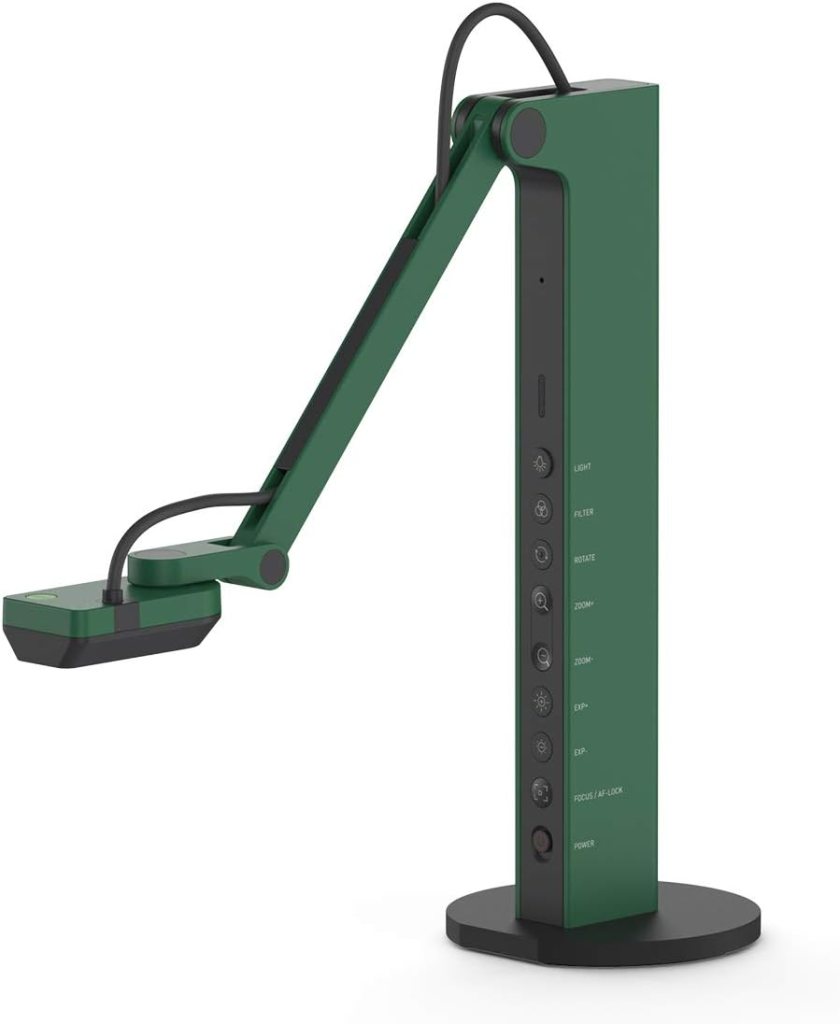
Best overall
The IPEVO VZ-R gets the top spot because it fits more classrooms than the others.
That sounds boring. It is not. Boring, in this case, is good.
The VZ-R gives you both HDMI and USB connectivity, which is still one of the smartest feature combinations in this category. You can plug directly into a display or run through a computer depending on the room and the lesson. That kind of flexibility matters more than an extra spec bullet.
It also doubles as a webcam, works across Mac, Windows, and Chromebook, and is built around the kind of live presentation use teachers actually care about.
What it does well in a real classroom
This is the model I would trust in a school where setups change from room to room. It feels less fragile than many bargain-looking options, and the HDMI mode makes it useful for teachers who just want to turn something on and teach.
Its image quality is strong enough for handwriting, book pages, printed worksheets, and quick object demos. More important, it feels versatile without becoming fiddly.
Pros
- HDMI and USB connectivity
- Works with common classroom computer platforms
- Can double as a webcam
- Good fit for projector-based teaching
- Reliable all-around feature set
Cons
- Not the sharpest sensor in this roundup
- Some teachers will not use the extra connection flexibility
- Accessories like HDMI cable may need to be added separately
Review summary
This is the safest pick for most teachers. Not because it wins every category. It does not. It wins because it makes the fewest bad tradeoffs.
Real Testimonial
The IPEVO VZ-R is the most well-rounded pick in this group. It earns that spot because it fits real classrooms better than most document cameras that look stronger on a spec sheet. The HDMI and USB support gives teachers more setup freedom, which matters if you switch between a projector, large display, or laptop-based lesson flow. Image quality is solid, focus is dependable, and the overall design feels made for teaching instead of just product marketing.
2. HUE HD Pro
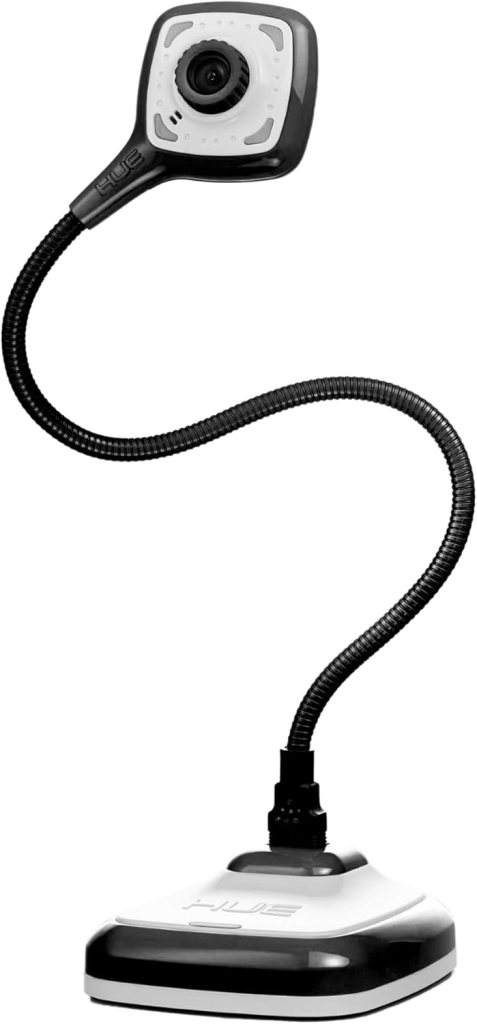
Best for simple everyday teaching
The HUE HD Pro is the pick for teachers who want something straightforward.
Not stripped down. Not flimsy. Just simple in a good way.
It offers full HD 1080p streaming, built-in LED lights, a built-in microphone with noise reduction, and broad compatibility across Windows, ChromeOS, macOS, and Linux. It is also lightweight and can be used without its base by plugging the flexible neck directly into a USB port.
That last detail is more useful than it sounds. Some teachers do not need an elaborate stand. They need something portable, fast to position, and easy to move.
Where it feels better than the spec sheet suggests
The HUE is not trying to dominate on raw image specs. It wins by being approachable.
That matters in elementary classrooms, small-group settings, intervention rooms, and anywhere teachers want a document camera that does not require a five-minute setup ritual every time.
Pros
- Very easy to use
- Portable and lightweight
- Built-in lights and microphone
- Broad OS compatibility
- Good choice for teachers who move between spaces
Cons
- 1080p image is fine, not exceptional
- Not ideal for teachers chasing the sharpest close-up detail
- USB only
Review summary
This one earns its place because it feels human-scaled. It is easy to live with. For a lot of teachers, that beats chasing specs.
Real Testimonial
The HUE HD Pro is a smart choice for teachers who want something easy to live with. It does not try to win on raw power. Instead, it stays simple, portable, and straightforward, which is exactly why it works. The flexible design makes repositioning easy, and the built-in light helps in less-than-ideal classroom conditions. Picture quality is good enough for everyday teaching, especially for books, worksheets, and quick demonstrations.
3. INSWAN INS-2 4K
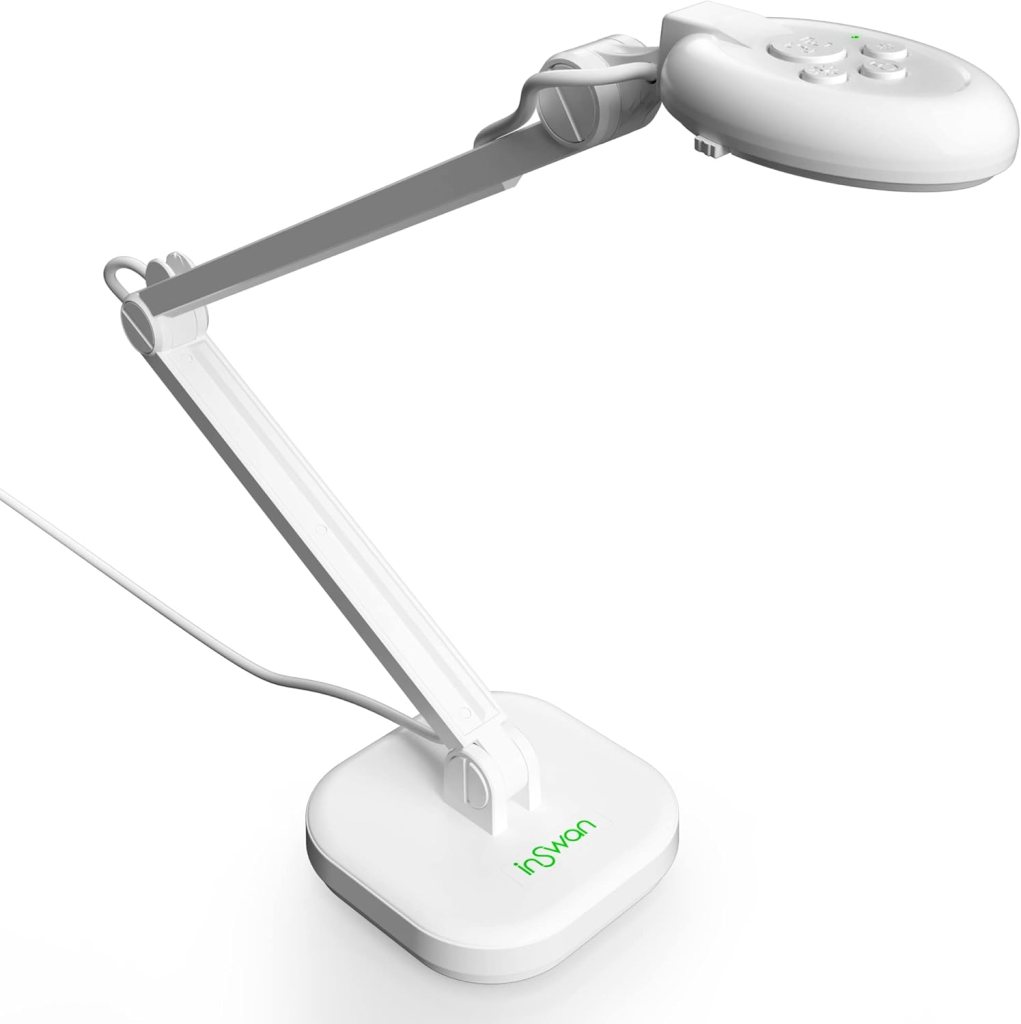
Best for sharp image quality
The INSWAN INS-2 4K is the image-quality pick.
It uses a 13MP sensor, supports 4K image capture, and covers an A3-size viewing area. The listing also highlights plug-and-play use and bundled Documate software features.
That combination makes it a strong fit for teachers who need crisp visuals. Think math notation, small print, science diagrams, music sheets, or anything else where muddy detail gets in the way.
Who should buy it
Teachers who care about clarity first.
That includes middle school and high school teachers who show dense material, art teachers working with larger pages, and anyone doing detail-heavy demonstrations on a regular basis.
Pros
- 13MP sensor
- 4K image capability
- A3 capture area
- Compact design
- Good fit for detail-heavy classroom material
Cons
- USB only
- Feature set may be more than some teachers need
- Less attractive if your setup depends on direct HDMI output
Review summary
If your first question is, “How sharp is the image?” this is probably your model. It is not the most flexible overall, but it is one of the strongest on visual performance.
Real Testimonial
The INSWAN INS-2 4K stands out for image clarity. If your teaching depends on showing small text, dense worksheets, diagrams, or anything detail-heavy, this model makes a strong case for itself. The 13MP sensor and broad A3 capture area give it a more capable, sharper feel than basic classroom cameras. That said, it is a more image-first product than a flexibility-first one.
4. JOYUSING V500S
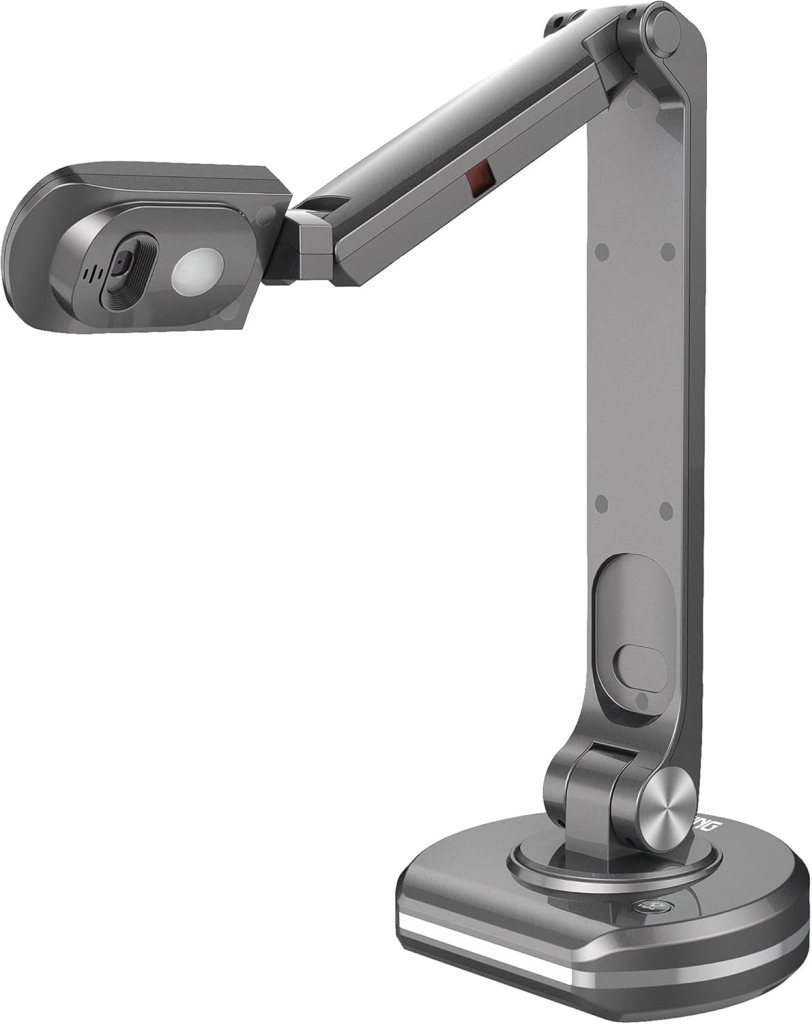
Best for hybrid teaching
The JOYUSING V500S lands in a useful middle ground.
It offers autofocus, a built-in microphone, built-in LED lighting, and a large capture area. Product materials also emphasize fast refocusing and suitability for classroom teaching and conferencing.
That makes it a good fit for hybrid teaching. Not because it is magical. Because it covers the basics teachers actually use when they are bouncing between classroom presentation and live online instruction.
What teachers will notice first
It adjusts quickly enough for active teaching, and the built-in mic helps when you need one device doing more than one job.
No, it will not replace a dedicated high-end camera setup. That is not the point. The point is convenience with enough competence to avoid frustration.
Pros
- Fast autofocus
- Built-in microphone
- Built-in LED light
- Large capture area
- Good for live demos and online teaching
Cons
- USB only
- Image quality is solid, not best-in-class
- Less polished brand recognition than some rivals
Review summary
This is the practical hybrid pick. It does not have the strongest personality in the bunch, but it checks the right boxes for teachers working across formats.
Real Testimonial
The JOYUSING V500S works best for teachers handling both classroom and online instruction. It covers the right basics without trying too hard to look premium. Autofocus is quick enough for active teaching, and the built-in light and microphone help when you need one device to do multiple jobs. It is a practical hybrid option, especially for teachers who share content over video calls or screen-based lessons.
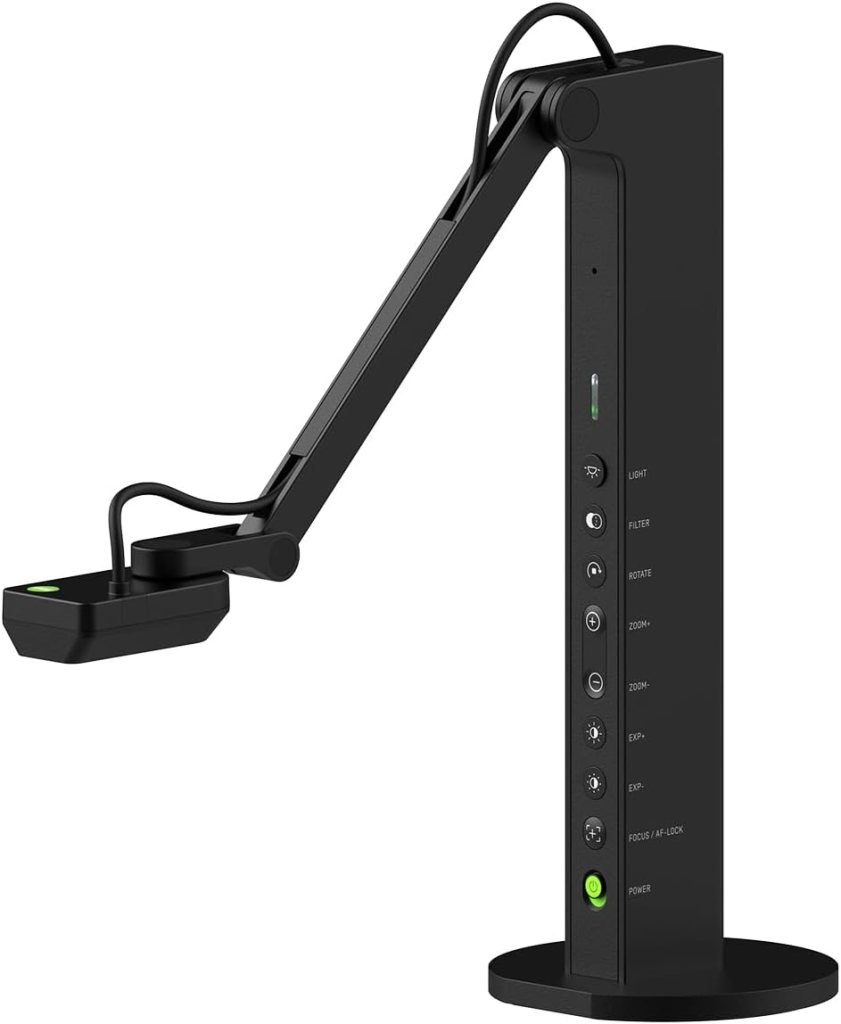
5. CZUR Fancy S Pro
Best for scanning and presenting
The CZUR Fancy S Pro makes sense for teachers who want one camera to do more than one job.
The listing highlights a 12MP sensor, 4K webcam functionality, autofocus, LED light, microphone, and support for remote teaching, live streaming, and web conferencing.
That is a pretty specific lane. Some teachers will not care. Others will love it.
Where it fits in a teacher workflow
This is a strong fit for teachers who scan handouts, present documents, record lessons, and occasionally need the camera to function more like a webcam or flexible visual tool than a simple overhead presenter.
It feels a bit more multi-purpose than classroom-pure. That is either a plus or a distraction depending on how you teach.
Pros
- 12MP sensor
- 4K webcam-style functionality
- Autofocus
- Built-in mic and light
- Useful for presentation plus scanning-style tasks
Cons
- A more niche fit for some classrooms
- USB only
- Less compelling if you only need simple live display
Review summary
This is the teacher pick for overlap. If you want one device for presenting, recording, and document capture, it makes sense. If not, one of the more classroom-focused models will probably suit you better.
Real Testimonial
The CZUR Fancy S Pro makes the most sense for teachers who want more than a standard document camera. It works well for presenting, scanning, recording, and webcam-style use, which gives it a broader role than the average classroom model. That flexibility is its main strength. It is not the cleanest pure teaching pick if all you want is a simple camera over a desk, but for teachers with a mixed workflow, it is appealing.
How to choose the right document camera for your classroom
If you teach in one room and use a projector or large display every day, I would lean toward the IPEVO VZ-R. HDMI makes life easier.
If you teach from a laptop and want something uncomplicated, the HUE HD Pro makes a lot of sense.
If you show dense worksheets, notation, diagrams, or fine print, the INSWAN INS-2 4K is the strongest image-first choice here.
If you split time between in-person and online teaching, the JOYUSING V500S is the most natural hybrid fit.
If you want one device to present, scan, and occasionally act like a webcam, the CZUR Fancy S Pro has the clearest reason to exist.
Which document camera is best for most teachers?
The IPEVO VZ-R is still the best overall pick.
That comes down to flexibility. HDMI plus USB is a real classroom advantage. It gives you more ways to use the camera without changing your whole routine.
The HUE HD Pro is the best pick for teachers who want a simpler, lighter setup.
The INSWAN INS-2 4K is the best choice for sharper detail.
The JOYUSING V500S is the best hybrid option.
The CZUR Fancy S Pro is the one to get if your workflow spills into scanning and recording.
FAQ
What is the best document camera for teachers?
For most teachers, the IPEVO VZ-R is the strongest overall choice because it supports both HDMI and USB, which gives it more classroom flexibility than most rivals.
Do teachers need a 4K document camera?
Not always. A good teacher document camera needs clear focus, readable handwriting, and enough stability to handle live lessons. 4K helps more when you show small details, dense text, or larger materials.
Is HDMI better than USB for a classroom document camera?
Neither is always better. HDMI is useful for direct display connections. USB is better when the camera runs through a laptop. If you want both options, a dual-mode camera is the smart play.
Can a document camera work as a webcam?
Some can. The IPEVO VZ-R product page explicitly says it can double as a webcam, and the CZUR Fancy S Pro is also positioned as a 4K webcam-style device.
What should teachers look for in a document camera?
Look at focus speed, image clarity, capture area, connection type, and how easy the device is to position during a lesson. Fancy extras matter less than smooth daily use.
Are document cameras good for math and handwriting lessons?
Yes. They are especially useful when you need to model equations, annotate worksheets, or show handwritten problem-solving in real time. Clear focus and good close-up rendering matter most for this.
Which document camera is best for elementary teachers?
The HUE HD Pro is a strong elementary option because it is simple, portable, and easy to reposition. The flexible neck and plug-and-play style are a good fit for lower-friction teaching.
Which document camera is best for remote teaching?
The JOYUSING V500S and CZUR Fancy S Pro both make sense for remote teaching because they combine presentation-friendly features with built-in audio and conferencing-oriented positioning.
Can a document camera show books and 3D objects clearly?
Yes, but results depend on focus speed, lighting, and capture area. Models with fast autofocus and larger viewing space tend to handle books and objects more smoothly.
Do document cameras need special software?
Not always. Some work as plug-and-play camera devices, while others include companion software for extra features like annotation or scanning tools. The HUE HD Pro and INSWAN INS-2 both emphasize straightforward compatibility.
Is OCR useful on a document camera?
Sometimes. OCR is more useful if you also plan to capture and convert documents beyond live presentation. For pure classroom display, it is less important than focus and image quality. Tech & Learning notes OCR as one of the features buyers may want to consider.
What is the difference between a document camera and a webcam?
A webcam is designed mostly for face-to-face video. A document camera is built to show papers, books, objects, and demonstrations from above or at an angle. Some newer models blur that line a bit.
Can you use a document camera with Zoom or Google Meet?
Many USB document cameras can work with conferencing tools as long as the computer recognizes them as camera inputs. Several models in this roundup are marketed for conferencing or remote teaching use.
Are document cameras worth it for teachers?
Yes, if you regularly model work, show close-up materials, annotate live, or teach visually. A good one saves time and keeps students focused. A bad one does the opposite.
Final take
If I were buying one today for actual classroom use, I would still take the IPEVO VZ-R first.
Not because it wins the beauty contest. Because it solves more teaching problems than the others do. It can run in more setups. It asks less from the teacher. That is the whole game.
Document cameras still matter because they make teaching more visible. That part has not changed, even as more classrooms mix in remote tools, conferencing, and digital displays. Educational library guidance makes the same broad case for their role in instruction and demonstration.
Affiliate Disclaimer
This article contains affiliate links. We may earn a small commission if you purchase through these links, at no extra cost to you.



Leave a Reply