The phrase the best stop motion cameras sounds simple until you actually try to animate with the wrong one. Then every little problem gets loud. Exposure shifts. Focus hunts. The camera refuses to play nicely with tethered software.
Your scene looks fine in one frame and slightly off in the next. That is how good animation turns into cleanup work. Canon’s stop motion firmware and Dragonframe’s camera support guidance both point in the same direction: consistency matters more than marketing fluff.
I did not build this list around generic “content creator” cameras. I built it around stop motion. That means reliable frame capture, manual settings that stay put, useful live view options, and gear that does not make you fight it for two hours before you shoot the first sequence.
Quick answer
The best overall pick is the Canon EOS R50 because it hits the sweet spot. It is small, sharp, easy to control, and supported for serious stop motion workflows.
The Canon EOS Rebel T100 is the better lower-cost starter pick if you want a straightforward DSLR with a proven tethered workflow.
The Sony ZV-E10 makes sense for creators who also want to use the same camera for video.
The Nikon Z30 is a strong small-studio option with proper Dragonframe support.
The Logitech BRIO 4K is the webcam pick for desk-based animation, LEGO builds, and anyone who wants the easiest route from camera to software.
Related articles
What actually matters in a stop motion camera
Stop motion is less forgiving than regular shooting. A camera can be excellent for travel, portraits, or YouTube and still be mildly annoying for animation.
You want manual exposure. You want focus you can lock and leave alone. You want dependable live view. You want a sensor that gives you enough detail to crop a little without the image falling apart. If you plan to use Dragonframe, support matters more than wishful thinking.
Dragonframe flat-out recommends choosing a supported camera with live view and camera control over USB, and specifically says Canon EOS and Nikon Z series are strong options for this kind of work.
A flip screen is nice. A huge burst rate is not important. Fancy autofocus is mostly irrelevant once your shot is locked. What helps more is a camera that stays predictable.
Comparison table 1
| Camera | Best for | Type | Lens system | Why it stands out |
|---|---|---|---|---|
| Canon EOS R50 | Best overall | Mirrorless APS-C | Canon RF / RF-S | Strong image quality, compact body, proven support |
| Canon EOS Rebel T100 | Best starter pick | DSLR APS-C | Canon EF / EF-S | Simple, familiar, affordable entry into manual shooting |
| Sony ZV-E10 | Best for hybrid creators | Mirrorless APS-C | Sony E-mount | Flexible lens system and sharp oversampled 4K |
| Nikon Z30 | Best for small studios | Mirrorless APS-C | Nikon Z | Compact body with solid tethered support |
| Logitech BRIO 4K | Best webcam option | Webcam | Fixed lens | Easiest desktop workflow for simple animation |
Comparison table 2
| Camera | Resolution / capture relevance | Screen or monitoring | Connectivity | Main drawback |
|---|---|---|---|---|
| Canon EOS R50 | 24.2MP APS-C, 4K 30p | Vari-angle touchscreen | USB, wireless | RF lens system costs more than older DSLR glass |
| Canon EOS Rebel T100 | 18MP APS-C, Full HD | Fixed rear screen | Wi-Fi app support | Older design and lower-spec live view |
| Sony ZV-E10 | 24.2MP APS-C, 4K from 6K oversampling | Vari-angle screen | USB streaming | Menu system still feels a little Sony-ish |
| Nikon Z30 | 20.9MP APS-C, 4K | Fully articulating screen | USB live view | No built-in viewfinder |
| Logitech BRIO 4K | 4K webcam, 1080p/60 | Computer-based preview | USB | Less control and image depth than an interchangeable-lens camera |
1. Canon EOS R50
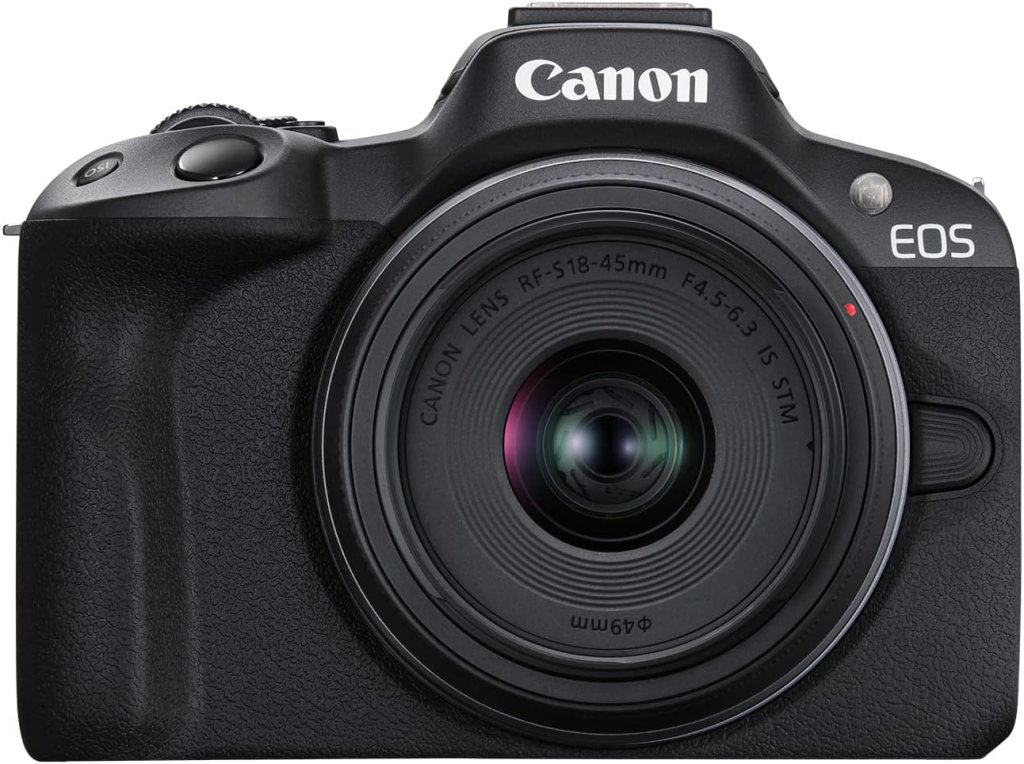
Best Overall Stop Motion Camera
This is the one I would hand to most people without a long speech.
The R50 has a 24.2MP APS-C sensor, Canon’s newer processing, a fully articulating screen, and a body that does not feel like punishment during setup. For stop motion, the main appeal is less glamorous: it is easy to lock down, easy to operate, and supported in Dragonframe.
Canon also offers stop motion firmware for select EOS cameras to improve live view resolution when used with compatible software, and Dragonframe lists the R50 as supported.
That combination matters. A lot.
The R50 also gives you room to grow. You can use it for stop motion today, then use it for product photos, tutorials, or behind-the-scenes video tomorrow. It does not feel like a dead-end purchase.
Pros
- Clean 24.2MP APS-C image quality
- Compact body that is easy to rig
- Vari-angle screen helps with awkward tabletop angles
- Supported by Dragonframe
- Better long-term lens path than older entry DSLRs
Cons
- RF lenses can get pricey fast
- Not everyone needs its video features for stop motion alone
Review summary: The R50 is the best overall pick because it keeps the process smooth. It is not the absolute cheapest, and it is not the most hardcore pro body. It just gets the balance right. That is usually the better answer.
Real Testimonial
This is still the best all-around stop motion pick in the group. The body is small, the 24.2MP APS-C sensor gives you plenty of detail for frame-by-frame work, and the flip screen makes rigging easier than it should be. It feels modern without being fussy. For stop motion, that matters more than flashy specs.
2. Canon EOS Rebel T100

Best Starter Pick for Beginners
The T100 is not sexy. Good. That is part of the appeal.
It is a basic DSLR with an 18MP APS-C sensor, Full HD video, and a stripped-back feature set that keeps things simple. Amazon listings for current new kits still show it widely available, and Dragonframe lists the Rebel T100 and Canon 4000D as supported.
For stop motion, a plain camera can be a relief. You are not buying it for speed. You are buying it because it can sit on a tripod, hold a composition, and let you work frame by frame without too much nonsense.
It also opens the door to Canon EF and EF-S lenses, which is useful if you want older lenses with good value and broad availability. The live view experience is not as modern as the R50’s. You feel the age. Still, for someone starting out with clay, paper cut, LEGO, or classroom animation, it is a very workable camera.
Pros
- Easy entry into interchangeable-lens stop motion shooting
- Supported by Dragonframe
- Simple DSLR layout
- Good option for first-time animators
Cons
- Fixed screen
- Older platform with fewer modern conveniences
- Lower resolution and less polished live view experience
Review summary: The T100 earns its place because it stays out of the way. It is the camera for people who want to learn the craft first and obsess over gear later.
Real Testimonial
The T100 is basic, but basic is not a bad thing here. It gives beginners a straightforward DSLR, an APS-C sensor, and a familiar manual shooting experience without a lot of distractions. The screen and overall design feel dated, but it still makes sense for someone who wants to learn stop motion on a proper camera body instead of a webcam or phone.
3. Sony ZV-E10
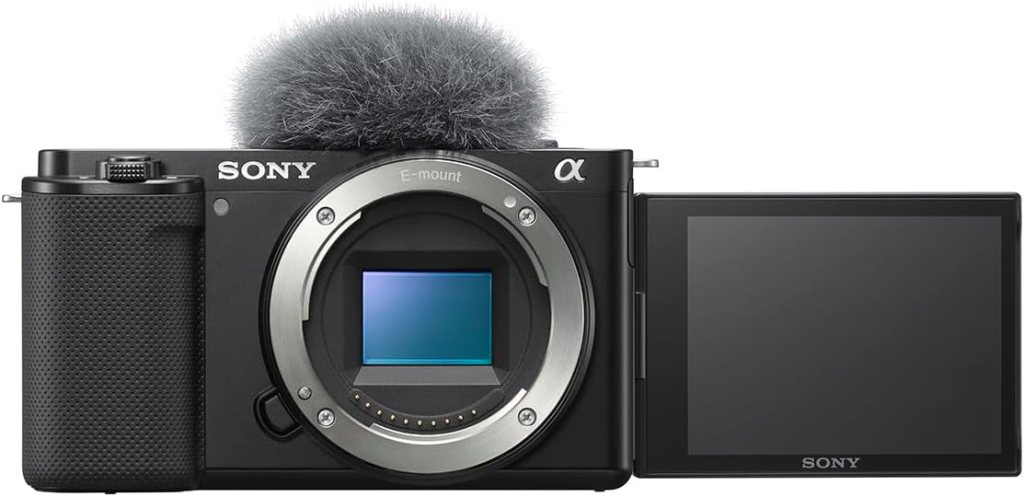
Best for Hybrid Creators
The ZV-E10 sits in an interesting spot. It is sold hard as a creator camera, but it also makes sense for stop motion if you want one camera that can do more than one job.
Sony gives you a 24.2MP APS-C sensor and 4K video oversampled from 6K. Dragonframe lists the ZV-E10 as supported, which is the key point here. Without that support, this camera would be a maybe. With it, the conversation changes.
The Sony E-mount ecosystem is one reason people buy into this body. You can keep it simple with the kit lens, then move into sharper primes later if your animation setup gets more ambitious. That flexibility is real.
The slight downside is that the ZV-E10 still feels like a camera built by engineers who enjoy menus. Once you get it configured, it behaves. Getting there is the part that takes patience.
Pros
- 24.2MP APS-C sensor
- Supported by Dragonframe
- Broad Sony E-mount lens options
- Strong hybrid value if you also shoot video
Cons
- Menu system is not exactly charming
- Best features are overkill if you only animate
Review summary: The ZV-E10 is for the person who wants one camera to cover stop motion, video, and general creator work without stepping into a much higher budget tier.
Real Testimonial
The ZV-E10 is the strongest hybrid option here. It gives you a 24.2MP APS-C sensor, a flexible lens mount, and strong video features that are useful if your stop motion setup overlaps with content creation or product work. It is less charming to configure than the Canon R50, but once it is dialed in, it is a very capable tool.
4. Nikon Z30
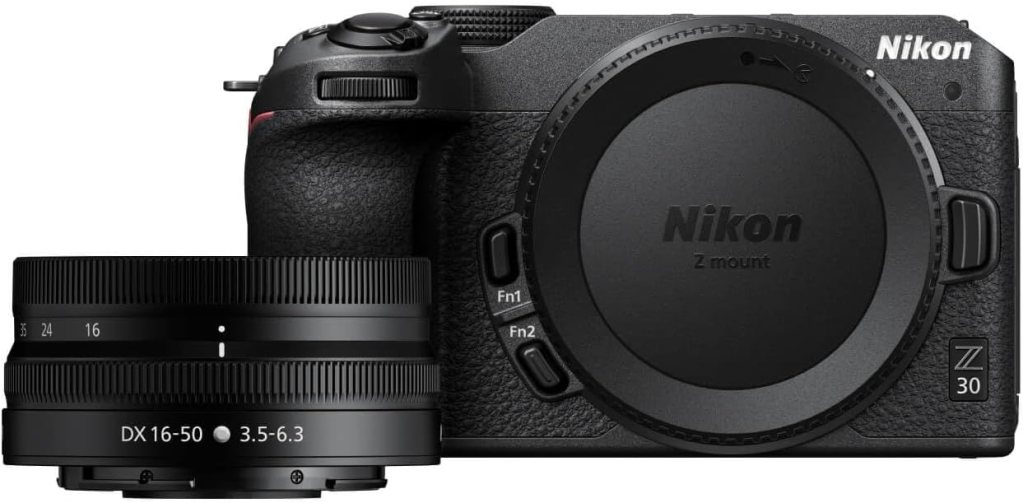
Best for Small Studio Setups
This is the camera I like for people with compact home setups who still want a real camera, not a webcam.
The Nikon Z30 uses a 20.9MP sensor, and Dragonframe has a dedicated setup page for it, noting USB live view support and control over ISO, shutter speed, aperture with digital lenses, image quality, and size.
That is exactly the kind of practical compatibility note I want to see before recommending a camera for animation.
It also feels less bulky than many entry cameras. On a tabletop rig, that matters. Less camera hanging off the front of your setup usually means less fiddling.
No viewfinder here, which some people hate on principle. For stop motion, I do not care much. You are probably using the screen or the software preview anyway.
Pros
- Solid Dragonframe support
- Compact body works well in tight spaces
- Good APS-C image quality
- Nikon Z lens system gives you room to grow
Cons
- No viewfinder
- Less common in stop motion discussions than Canon, so there is less community chatter around it
Review summary: The Z30 is a smart pick for animators who want something modern and compact without defaulting to Canon. Not flashy. Just sensible.
Real Testimonial
The Z30 is a smart pick for tight tabletop setups. It is compact, light, and gives you Nikon’s APS-C mirrorless image quality in a body that does not feel oversized for animation work. No viewfinder, sure, but for stop motion that is rarely a real problem. This one is about practicality.
5. Logitech BRIO 4K
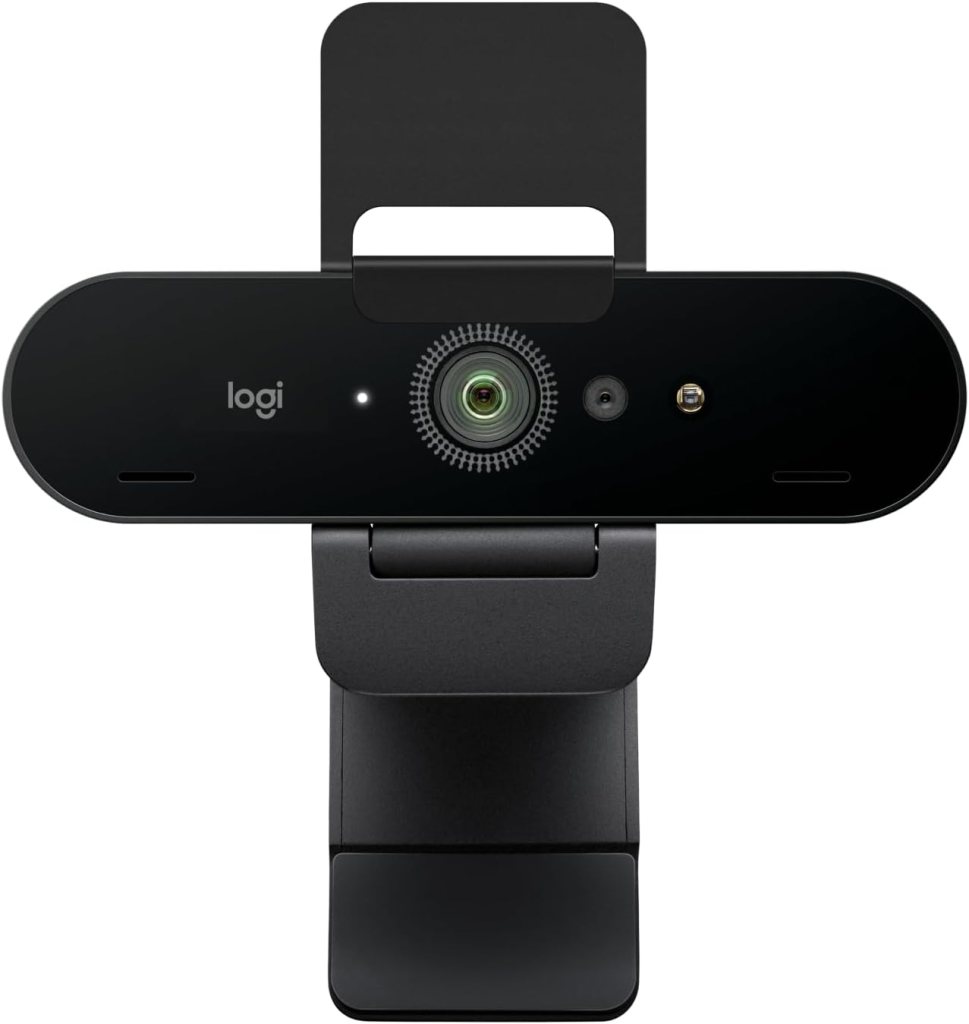
Best Webcam for Stop Motion
A webcam is not the romantic answer. Sometimes it is the correct answer.
Dragonframe lists the Logitech BRIO and BRIO 4K among supported webcam options, and current Amazon listings show the BRIO 4K as a still-available model with 4K capture support.
That makes it a real option for simple stop motion setups, especially desktop animation, overhead paper animation, classroom work, and quick LEGO projects.
The biggest advantage is speed. Plug it in. Aim it. Start capturing.
The biggest limitation is also obvious. You do not get the same image depth, lens options, or manual precision that you get from a proper camera body. But not every project needs that. Some people need a clean workflow more than cinematic blur.
Pros
- Fastest setup in this guide
- Supported webcam path in Dragonframe
- Good for desks, classrooms, and casual animation
- 4K-capable webcam option
Cons
- Fixed-lens webcam look
- Less control than a DSLR or mirrorless body
- Not the right pick for more polished commercial work
Review summary: The BRIO 4K is not trying to be a cinema camera. It is the practical answer for people who want to animate more and troubleshoot less.
Real Testimonial
This is the easiest path for desk-based stop motion. Plug it in, frame the scene, start shooting. You do not get the depth or lens control of an interchangeable-lens camera, but for LEGO animation, classroom use, or simple desktop projects, it keeps friction low. That alone makes it useful.
Which one should you actually buy?
Get the Canon EOS R50 if you want the best mix of image quality, ease, and future-proofing.
Get the Canon EOS Rebel T100 if you want the most approachable lower-cost interchangeable-lens option and do not mind using an older DSLR body.
Pick the Sony ZV-E10 if you want one camera that can handle stop motion and modern creator work without feeling limited six months from now.
Go with the Nikon Z30 if your setup is small, your taste runs minimalist, and you want clean tethered support.
Choose the Logitech BRIO 4K if you are animating at a desk and want the fastest path from idea to finished frames.
FAQ
What is the best camera for stop motion animation?
For most people, the Canon EOS R50 is the best camera for stop motion animation because it gives you strong image quality, a practical body size, and supported workflow options without feeling too specialized.
Is a DSLR or mirrorless camera better for stop motion?
Mirrorless usually makes more sense now because live view workflows are better and newer systems have more growth ahead of them. DSLR bodies can still work well, though, especially if they are supported and you want a simpler, lower-cost entry point.
Can I use a webcam for stop motion?
Yes. A supported webcam can be a very practical stop motion tool for desktop projects, classrooms, paper animation, and beginner setups. Dragonframe lists Logitech BRIO models and the C920 among supported webcam options.
Do I need 4K for stop motion?
Not really. You need consistency more than you need headline resolution. Extra resolution helps with cropping and flexibility, but clean frame-by-frame capture matters more.
What lens is best for stop motion animation?
A normal zoom or modest prime usually works best. You want something sharp, easy to frame with, and not too wide unless your set is very tight. For tabletop work, a standard kit zoom is often enough.
Is Canon good for stop motion?
Yes. Canon is one of the strongest names in stop motion workflows because of its broad Dragonframe support and its stop motion firmware options for select EOS models.
Can beginners use Dragonframe with these cameras?
Yes, provided they choose a supported camera and follow the setup instructions for that model. Dragonframe publishes both a general support list and model-specific setup guidance.
What camera is best for LEGO stop motion?
For simple LEGO animation on a desk, the Logitech BRIO 4K is often enough. For cleaner files and more room to improve your setup, the Canon EOS Rebel T100 or Canon EOS R50 is a better long-term move.
What camera is best for claymation?
Claymation benefits from stable manual control and good detail, so the Canon EOS R50 and Nikon Z30 are both strong choices. They let you keep your look consistent while still giving you enough resolution for close-up work.
Do I need manual settings for stop motion?
Yes. Auto settings can shift between frames, and those tiny shifts become visible flicker once the animation plays back.
Can I use autofocus for stop motion?
You can, but it is usually smarter to set focus once and leave it there. Stop motion rewards control, not constant adjustment.
What frame rate matters for stop motion if I am shooting stills?
What matters is your playback frame rate in the final project, not a camera’s burst or high-speed video spec. Many stop motion projects are built around 12 or 24 frames per second in editing.
Is a phone better than an entry-level camera for stop motion?
Sometimes for convenience, yes. For control and image consistency, not usually. A supported camera body still gives you a more serious workflow.
What accessories matter more than the camera itself?
A sturdy tripod or copy stand, consistent lighting, a remote or tethered capture setup, and software that does not fight you matter a lot. Good lighting probably fixes more stop motion headaches than a camera upgrade does.
How much resolution do I really need for stop motion?
Enough to crop a little and still deliver a clean final frame. Around 18MP to 24MP is already plenty for most stop motion projects in this range.
Final thoughts
The best stop motion camera is the one that disappears once the scene is built. That is really it. You do not need the most dramatic spec sheet. You need a camera that stays steady, plays nicely with your software, and lets you focus on movement, timing, and tiny decisions that make animation feel alive.
That is also why stop motion guides from working camera publications keep circling back to support, usability, and consistency over headline features.
Affiliate Disclaimer
This article contains affiliate links. We may earn a small commission if you purchase through these links, at no extra cost to you.




Leave a Reply