
Light bulb cameras are one of those products that sound a little silly until you realize why people buy them. Fast setup. No drilling. No fresh wiring. You screw one into a socket, connect it to Wi-Fi, and suddenly a dead corner of the house starts pulling its weight.
The catch is that this category is crowded with lookalike models, inflated claims, and apps that can turn a simple setup into a long afternoon.
So this list of the 5 best light bulb cameras focuses on the handful that make practical sense right now, with attention to video quality, connection stability, motion alerts, and how they fit real homes instead of fantasy spec sheets.
The privacy side matters too, especially with connected cameras, which is why it helps to pay attention to app permissions, account security, and device settings from day one.
Quick picks at a glance
- Best overall: LaView 4MP Bulb Security Camera 5G & 2.4GHz
- Best for straightforward indoor coverage: LaView 4MP Bulb Security Camera 2.4GHz
- Best for smarter alerts: Noahcam Light Bulb Security Camera 5G 2K
- Best for connection stability: Gianteye 2K Light Bulb Camera Outdoor
- Best for entry-point lighting and night coverage: WYZE Bulb Cam Security Camera
Related articles
- 5 Best Wired (PoE) Security Camera Systems
- Top 5 4G LTE Cameras for Off-Grid Security
- 8 Best REOLINK Cameras (Buyer’s Guide)
What actually matters before you buy one
Resolution matters, but not as much as brands love to pretend. A decent 2K feed with usable night vision and stable motion alerts is worth more than a higher number attached to muddy footage. In this category, I care more about whether the camera catches faces near a doorway, whether the app loads quickly, and whether motion tracking is useful instead of twitchy.
Wi-Fi support also deserves more attention than most buyers give it. Plenty of bulb cameras still rely on 2.4GHz only, which is fine in smaller homes, but dual-band support gives you more flexibility if your router setup is crowded or your socket sits in a weird signal pocket near a garage or exterior wall.
Then there’s the privacy piece. The FTC recommends looking for cameras that encrypt account information, livestreams, and archived video, and NIST’s smart-home guidance pushes the basics people skip when they’re in a hurry, like enabling authentication and tightening settings early instead of “later.” Later usually never comes.
Comparison table: core specs
| Product | Best for | Resolution | Wi-Fi | Night vision | Audio | Smart assistant |
|---|---|---|---|---|---|---|
| LaView 4MP Bulb Security Camera 5G & 2.4GHz | Best overall | 4MP / 2K class | 5GHz + 2.4GHz | Full-color night vision | Two-way audio | Alexa |
| LaView 4MP Bulb Security Camera 2.4GHz | Indoor coverage | 4MP / 2560×1440 | 2.4GHz | Starlight color night vision | Two-way audio | Alexa |
| Noahcam Light Bulb Security Camera 5G 2K | Smarter alerts | 2K | 5GHz + 2.4GHz | Color night vision | Two-way audio | Alexa |
| Gianteye 2K Light Bulb Camera Outdoor | Stronger connectivity | 2K | 5GHz + 2.4GHz | Color night vision | Two-way audio | App-based |
| WYZE Bulb Cam Security Camera | Entry-point coverage | 2K | Wi-Fi connected | Color night vision | Two-way audio | Alexa / Google Assistant |
Comparison table: real-world fit
| Product | Best location | Main strength | Main drawback |
|---|---|---|---|
| LaView 5G & 2.4GHz | Porch, garage, large room | Balanced feature set | Brand still plays in a crowded generic category |
| LaView 2.4GHz | Hallway, nursery, apartment interior | Easy setup and strong coverage | No 5GHz support |
| Noahcam 5G 2K | Front entry, shared household | AI motion filtering and shared access | Not as established as bigger camera brands |
| Gianteye 2K Outdoor | Detached garage, side yard socket | Strong dual-band pitch | Harder to separate from white-label competition |
| WYZE Bulb Cam | Front door light fixture | Better-known ecosystem and actual bulb utility | Less pan-and-tilt flexibility than the rotating bulb cams |
1. LaView 4MP Bulb Security Camera 5G & 2.4GHz

Best Overall
This is the one I’d start with for most people. Not because it’s glamorous. It isn’t. It just hits the right balance of features without drifting into gimmick territory.
The Amazon listing calls out 4MP imaging, full-color night vision, motion detection, an audible alarm, easy screw-in installation, Alexa compatibility, and dual-band Wi-Fi. That’s a strong mix for a product type that usually asks you to compromise somewhere obvious.
The real reason it lands at the top is that dual-band support removes one of the most common headaches in light bulb cameras.
If you’ve ever fought with a 2.4GHz-only smart device while your home network got more crowded, you know the feeling. This model gives you more breathing room. It also makes more sense for a garage, covered porch, or bigger interior room where signal quality can get uneven.
Review summary: Best all-around blend of image quality, connection flexibility, and security basics. Not exciting. Just useful.
Pros
- Dual-band 5GHz and 2.4GHz Wi-Fi
- 4MP video
- Color night vision
- Motion detection and alarm
- Two-way communication features
- Alexa support
Cons
- Brand confidence is decent, not elite
- Like most bulb cams, it still depends heavily on app behavior over time
Real Testimonial
This is the easiest product in the group to recommend without caveats swallowing the praise. It has the strongest all-around feature mix: 4MP video, dual-band Wi-Fi, 360° coverage, full-color night vision, motion detection, alarm features, and Alexa support. The real selling point is balance. Nothing about it feels overly narrow or gimmicky, so it works for buyers who want one camera that can handle a porch, garage, or big interior room without much fuss.
2. LaView 4MP Bulb Security Camera 2.4GHz

Best for Straightforward Indoor Coverage
This is the quieter pick in the lineup. If the first LaView model is the flexible one, this is the simpler one. It uses 2.4GHz Wi-Fi, records at 2560×1440, offers 360-degree coverage, tracks motion, includes two-way audio, and has a 110 dB alarm siren.
That’s plenty for an apartment, hallway, basement, kid’s playroom, or any interior socket where setup speed matters more than squeezing every possible feature into one device.
I also like that the use case is obvious. Some products try to be everything and end up feeling vague. This one feels more honest.
It’s the kind of camera you buy because you want a decent view of an interior space without mounting brackets, drilling, or overthinking the install.
Review summary: A clean, simple indoor choice with strong basic specs and less setup friction.
Pros
- 4MP resolution with clear spec listing
- 360-degree panoramic coverage
- Starlight color night vision
- Motion tracking
- Two-way audio and siren
- Easy E27 socket installation
Cons
- 2.4GHz only
- Better suited to indoor or protected placements than exposed exterior use
Real Testimonial
This one makes the most sense for simple indoor coverage. It keeps the useful parts of the LaView formula, including 4MP resolution, 360° viewing, motion detection, audible alarm support, and Alexa compatibility, but without the extra pitch around dual-band networking. That makes it a cleaner fit for apartments, hallways, basements, and general indoor monitoring where easy setup matters more than squeezing every last networking feature into the device.
3. Noahcam Light Bulb Security Camera 5G 2K

Best for Smarter Alerts and Shared Access
Noahcam makes sense if your biggest annoyance with security cameras is bad motion alerts. The product listing emphasizes AI motion sensor alerts, 24/7 recording, and the ability to distinguish movement more intelligently, with support for tracking people while filtering out some useless noise.
That alone makes it more interesting than half the category. A camera that nags you every five minutes is not smart. It is just needy.
It also works well for households that want shared access. Some camera apps feel like they were built for one person and reluctantly tolerated everyone else.
Noahcam leans more toward family use, front-entry monitoring, and general household visibility. If your goal is to keep tabs on a doorway, package area, or driveway-adjacent fixture without drowning in false alarms, this one earns its spot.
Review summary: Strong fit for buyers who care more about alert quality than flashy headline specs.
Pros
- AI-assisted motion alerts
- 24/7 recording pitch
- Dual-band support on current listing
- Two-way audio
- Good fit for shared household access
Cons
- Brand recognition is limited
- AI claims in this tier should always be treated with a little caution until you live with them
Real Testimonial
The Noahcam stands out because its listing leans into practical daily-use features instead of just shouting resolution numbers. It offers 2K video, 360° coverage, 24/7 motion sensing, color night vision, and two-way audio, which makes it a strong fit for front-entry monitoring or shared household use. I would position it as the best option for buyers who care most about alerting and active monitoring rather than just getting a live view on demand.
4. Gianteye 2K Light Bulb Camera Outdoor

Best for Stronger Dual-Band Connectivity
Gianteye gets the connectivity slot because its current product page leans hard into what buyers actually struggle with: lag, weak signals, and setup that falls apart near the edge of Wi-Fi range.
The listing specifically highlights 5GHz and 2.4GHz dual-band support, a standard E27 socket fit, and fast setup through the companion app. That may sound basic. It isn’t. Reliability is a feature.
This is the pick I’d look at for a side entrance, detached structure, or awkward outdoor socket where the signal can get thin.
Not because the image specs are radically better than the others, but because a camera that stays connected is better than a theoretically sharper one that flakes out every few days. That sounds obvious until you own one.
Review summary: Best fit for buyers who care about stable streaming and easier network placement.
Pros
- Dual-band Wi-Fi
- E27 screw-in install
- 360-degree coverage style
- Good use case for tricky signal areas
Cons
- Less established brand reputation
- Category overlap with many similar-looking products makes long-term confidence harder
Real Testimonial
This is the connectivity-first option. Its Amazon listing highlights 2.4/5GHz Wi-Fi 6 support, 360° PTZ coverage, color night vision, AI human detection, and two-way talk. That combination makes it appealing for side yards, garages, or outdoor sockets where connection quality is often the first thing to go wrong. The product itself is less distinctive as a brand, but the networking angle is stronger than average for this category.
5. WYZE Bulb Cam Security Camera
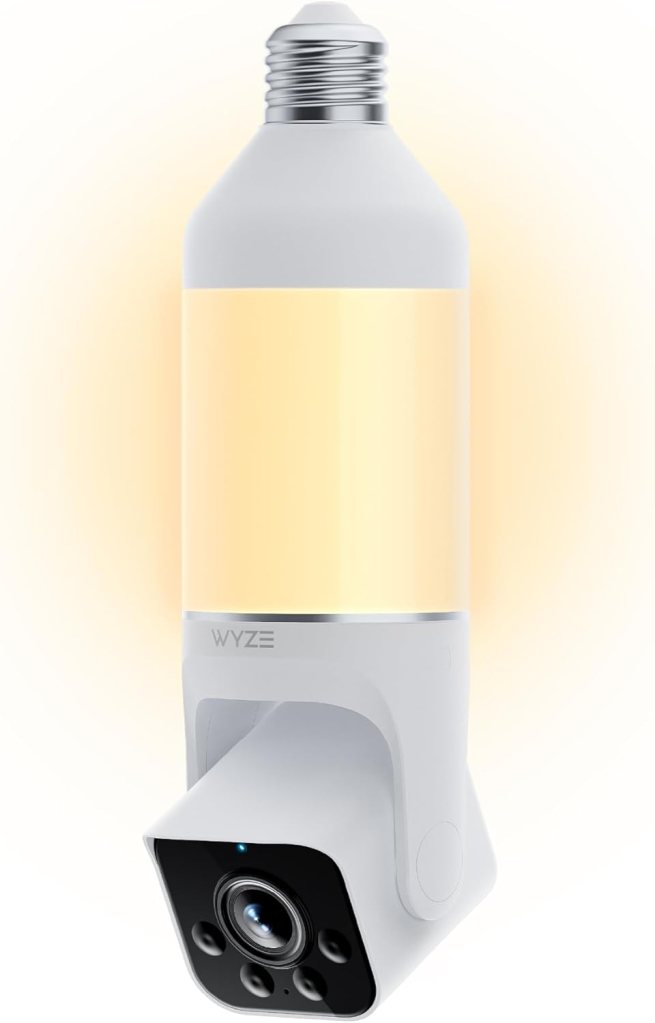
Best for Entry-Point Lighting and Night Coverage
Wyze is the outlier here because it feels less like a generic bulb camera and more like an actual product ecosystem.
The Wyze Bulb Cam combines 2K video, color night vision, motion detection, a siren alarm, smart assistant support, and an integrated dimmable bulb concept rather than simply hiding a camera in a plastic shell that screws into a socket.
Wyze’s own product page also highlights a 160-degree view and group lighting options, which gives it a more purposeful identity than most of the rotating bulb-style cameras.
It is the one I’d lean toward for a front porch or entry point where the light itself matters. That’s the difference. Most of these products are cameras first and “bulbs” in the technical sense only.
The Wyze model behaves more like a security light with a camera built in. For a lot of homes, that’s the smarter direction.
Review summary: Best for people who want a better-known smart-home brand and a fixture that still works like a light.
Pros
- Better-known camera ecosystem
- 2K video and color night vision
- Motion detection and siren
- Alexa and Google Assistant support
- Dimmable light functionality
Cons
- Less of the spinning panoramic-camera style some buyers want
- Better for targeted entry coverage than whole-room roaming views
Real Testimonial
The Wyze product feels different from the usual rotating bulb camera pile because it is built more like a smart outdoor light with camera features baked in. The current Amazon US listing for this page is a renewed unit, and it emphasizes 2K HD video, color night vision, a dimmable LED bulb, motion detection, siren alarm, and Alexa/Google Assistant support. That makes it the most natural choice for entry-point coverage where the light itself matters as much as the camera.
Which one would I actually buy?
If I wanted the safest all-around choice, I’d buy the LaView 5G & 2.4GHz. It checks the most boxes without turning into a science project.
If I wanted something for a basic interior room and didn’t need dual-band Wi-Fi, I’d take the 2.4GHz LaView and move on with my life.
If I cared most about smarter motion filtering, I’d try the Noahcam. If my Wi-Fi setup had dead spots near an exterior socket, I’d look hard at Gianteye. If the fixture itself mattered and I wanted a more established smart-home brand, I’d take the Wyze.
That said, there’s a limit to what a bulb camera should do.
If you need rock-solid outdoor coverage, better weather resistance, stronger local storage options, or a security setup you plan to trust for years, a standard outdoor camera or PoE system is usually the better buy.
Light bulb cameras are convenience devices first. Good ones are useful. They are not magic.
Who should buy a light bulb camera
These make the most sense for renters, apartment owners, and anyone who wants quick coverage without drilling holes. They also work well in garages, hallways, porches with existing sockets, laundry rooms, and side entrances where adding a camera the traditional way feels like overkill.
They make less sense for people who want high-end surveillance, serious local-network control, or better data handling. That buyer is usually happier with a purpose-built wired or outdoor system. Not because light bulb cameras are useless, but because convenience has a ceiling.
FAQ
Are light bulb cameras any good?
Some are. The decent ones are useful for quick coverage in places where you already have a light socket and don’t want to mount a traditional camera. The weak ones tend to fall apart on app quality, alert accuracy, or connection stability.
Do light bulb cameras work without Wi-Fi?
Most still need Wi-Fi for live view, app control, and remote alerts. Some can record locally depending on storage support, but the core experience is built around network access.
Can a light bulb camera record all the time?
Some listings advertise 24/7 recording, but that depends on the model, storage setup, and app ecosystem. Noahcam explicitly pitches 24/7 recording on its current listing.
Are light bulb security cameras legal?
Laws vary by location, but in general you can use home security cameras on your own property. Audio recording rules can be stricter than video rules, especially if you record conversations without consent. Check local law before you assume anything. [Unverified]
Can you use a light bulb camera outside?
Some are marketed for outdoor or outdoor-indoor use, but placement still matters. A covered porch socket is not the same thing as full exposure to hard weather. Read the product limitations carefully.
Do light bulb cameras need a subscription?
Not always. Some support local storage, while others push cloud features more aggressively. This varies a lot by brand and app.
How do light bulb cameras get power?
They draw power from the light socket itself, usually an E26 or E27 style socket depending on the model. That’s the main reason they’re so easy to install.
Are light bulb cameras easy to hack?
Any internet-connected camera can be exposed if the account security is weak or the settings stay at defaults. The FTC recommends looking for encryption and changing security settings early. NIST also recommends stronger authentication and better smart-home hygiene in general.
What is the difference between a light bulb camera and a regular Wi-Fi camera?
A light bulb camera trades flexibility for convenience. It installs fast and uses existing power, but it’s tied to socket placement. A regular Wi-Fi camera often gives you more mounting options and, depending on the model, better long-term reliability.
Can a light bulb camera replace a porch camera?
Sometimes, yes. Especially if the porch already has a good socket position and you want simple coverage. If you need broader weather resistance, stronger image tuning, or more dependable detection, a dedicated porch or floodlight camera is usually a better move.
Do light bulb cameras work with Alexa?
Several current models do, including the LaView picks and the Wyze Bulb Cam.
What is the best light bulb camera for an apartment?
The LaView 4MP Bulb Security Camera 2.4GHz is a strong apartment pick because it’s simple, covers a room well, and doesn’t ask much from the install.
What is the best light bulb camera without a monthly fee?
[Unverified] That depends on the brand’s storage options and which features are locked behind cloud plans. Models with microSD or other local recording options are usually the better place to start.
Are light bulb cameras good for garages?
Yes, garages are one of the better use cases, especially if you already have an overhead socket and want fast visibility without mounting hardware. Dual-band models make more sense if the garage signal is spotty.
Do light bulb cameras still work if the light switch is turned off?
No. If the socket loses power, the camera loses power too. That sounds obvious, but people forget it all the time.
Conclusion
The best light bulb cameras are not trying to replace a full security system. They’re solving a simpler problem. You have a socket. You want coverage. You do not want to spend your weekend drilling into siding.
For that job, the LaView 5G & 2.4GHz is the best overall pick here, the LaView 2.4GHz is the easiest indoor recommendation, and the Wyze Bulb Cam is the smartest choice if you want a more recognizable smart-home ecosystem.
Just go in with clear eyes: convenience is the selling point, not perfection. And once you install one, lock down the settings, tighten the account security, and treat it like the connected device it is. That part is not optional.
Affiliate Disclaimer
This article contains affiliate links. We may earn a small commission if you purchase through these links, at no extra cost to you.






Leave a Reply